-
Baidu Translate
- Size: 114.24M
- Language: Simplified Chinese
- Category: foreign language learning
- System: winall







Baidu Translate is a powerful and easy-to-use translation software that is suitable for a variety of scenarios and groups of people. Whether it is daily communication, study and research, or business cooperation, it can provide accurate and smooth translation services.

Baidu Translation Highlights
Neural Machine Translation (NMT)
Using advanced NMT technology, the wording can be reasonably adjusted according to the context, and the translation will be natural and smooth, greatly improving the translation quality.
Won the second prize of the National Science and Technology Progress Award, and its translation quality is in a leading position in the industry.
Offline translation
Supports downloading of offline language packs, users can translate without network environment, suitable for use when traveling abroad.
Real-time translation
Whether it is text translation or voice translation, Baidu Translate can respond in real time to ensure smooth communication.

Baidu translation function
Multi-language translation: Supports translation into 27 popular languages (some say it supports translation into more than 20 languages), including Chinese, English, Japanese, Korean, Thai, German, French, Portuguese, etc., to meet the translation needs of different users. Among them, the translation quality in the spoken language and tourism fields far exceeds the industry level, covering all language pronunciation services.
Text translation: Users can directly input text for translation, which is suitable for various daily learning and work scenarios. The system can also automatically determine the language based on the input text and provide corresponding translation results.
Voice translation: Supports real-time voice translation. Users can translate through voice input. Clicking the TTS pronunciation button can also obtain the pronunciation of Chinese and English translations, which greatly facilitates oral communication and timely translation needs. It is especially suitable for use when traveling abroad or communicating across languages.
Photo translation: Recognize and translate text in pictures by taking photos, suitable for reading foreign language books, menus and other scenarios. It supports multi-lingual camera photo translation, and also provides a variety of photo translation methods such as smear translation, physical translation, and word translation.
Offline translation: Users can download offline language packs (such as English, Japanese, Korean, etc.) and perform basic translation operations without an Internet connection.
Bilingual comparison: Users can view the comparison results of the original text and the translated text word by word and sentence by sentence.
One-click copying and collection of results: With one click, you can copy all translation results or collect original translations.

Baidu TranslateFAQ
How to translate pictures in Baidu Translator PC version?
Open the computer version of Baidu Translate, and at the same time open the picture to be translated (you can save it to the desktop in advance or open it through a folder to ensure that the text in the picture is clearly visible).
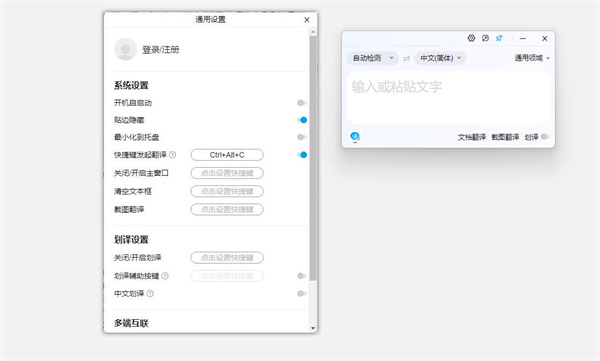
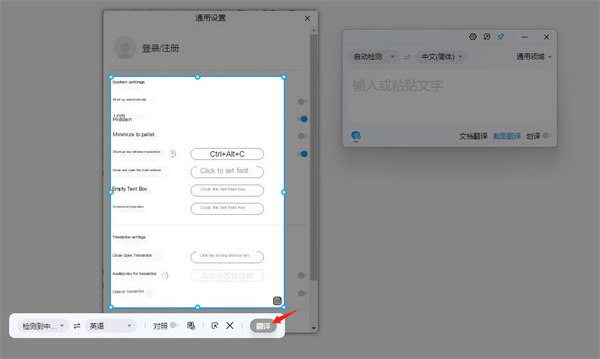
Find the "Screenshot Translation" button with the scissors icon in the lower right corner of the software and click it, then drag the mouse to accurately select the text area in the picture that needs to be translated (try to avoid redundant backgrounds to improve recognition accuracy).
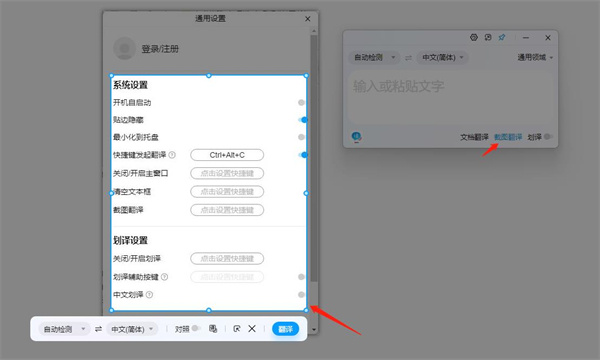
After the frame selection is completed, click the "Translate" button in the lower right corner of the screenshot toolbar. The system will quickly recognize the text and generate the corresponding translation, which will be displayed in the interface immediately.
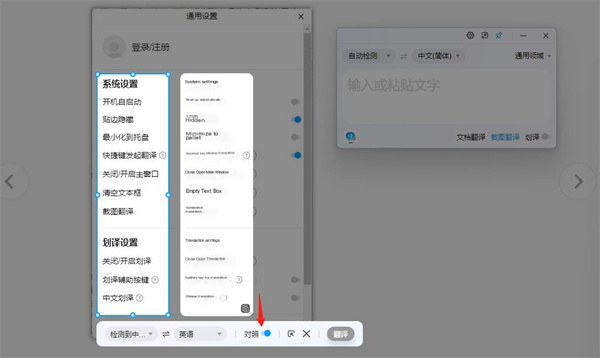
If you need to compare it with the original text, you can click the "Compare" button on the translation interface to switch to column mode - the text in the selected area of the original image is displayed on the left, and the translation results are displayed on the right, making comparison more intuitive.
Baidu Translation update log:
1. The pace of optimization never stops!
2. More little surprises are waiting for you to discover~
Huajun editor recommends:
Baidu Translate is an excellent software for foreign language learning. The editor strongly recommends it to you. Once you download it, you will know how good it is. The editor has also prepared electronic versions of Coco Baby, Wuyou English, and Chinese Idiom Dictionaries for you.
Version: 2.1.0 | Update time: 2025-11-03
Similar recommendations





Latest updates





Baidu Translation Online Translation-English Online Translation Web Version Entrance
How to translate the menu in Baidu Translate - How to translate the menu in Baidu Translate
ai artificial intelligence tool-Baidu Translation free registration and usage tutorial sharing
How to upgrade software in 360 Software Manager? -How to upgrade software in 360 Software Manager
Baidu translation review
-
1st floor Huajun netizen 2025-02-10 10:46:51Baidu Translate's interface design is easy to use and has rich functions. I highly recommend it!
-
2nd floor Huajun netizen 2025-01-25 10:38:09The overall feeling of Baidu Translation is good, I am quite satisfied, the installation and operation are very smooth! It went very smoothly following the installation step-by-step guide!
-
3rd floor Huajun netizen 2025-01-19 06:34:38Baidu Translation is not bad, the download is very fast, I give you a good review!
Recommended products
-

English speaking king
-

Primary school English sixth grade reading e-textbook
-

English fun dubbing computer version
-

English speaking practice software
-

Trados
-

People's Education Press pep primary school English fifth grade second volume reading software
-

Primary school English for fifth grade, second volume reading e-textbook
-

Primary school English synchronous classroom
-
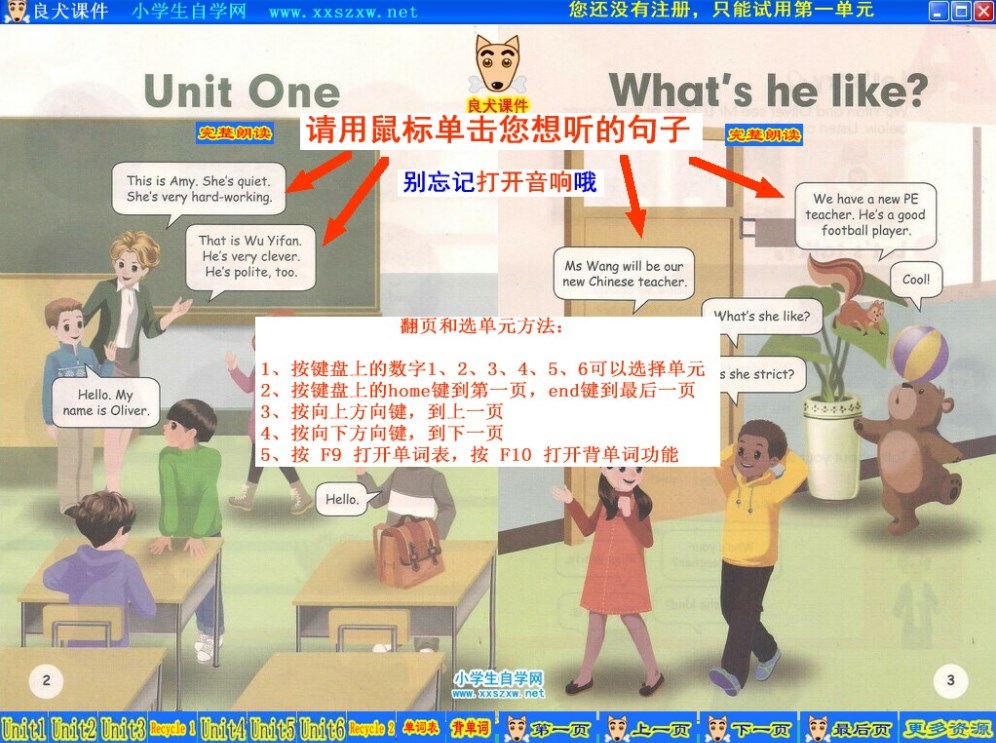
Primary school English fifth grade reading e-textbook
-

People's Education Press PEP Primary School English Reading Software for Third Graders 2013
- Diablo game tool collection
- Group purchasing software collection area
- p2p seed search artifact download-P2P seed search artifact special topic
- adobe software encyclopedia - adobe full range of software downloads - adobe software downloads
- Safe Internet Encyclopedia
- Browser PC version download-browser download collection
- Diablo 3 game collection
- Anxin Quote Software
- Which Key Wizard software is better? Key Wizard software collection




