
-
fortunate acquaintance
- Size: 148.39M
- Language: Simplified Chinese
- Category: social chat
- System: Android
- Manufacturer:Beijing Linke Technology Co., Ltd.


The latest version of Xingshi app is a young and fresh social software. This software is specially designed for those born after 2000. After downloading the software and entering the app, you can create your own virtual character. You can freely pinch your face, dress up your personality, complete your personal information, add interest and hobby tags, and then enter the chat and interaction interface. Huajun Software Park provides you with a lucky download, come and experience it!

Highlights of Xingshi Software
Cyber Funeral:
Users can choose the latest trendy tombstones of the season, customize the exclusive BGM for the funeral, write down their own bucket list, and wait for friends to send you electronic offerings.
This is the end of the world:
Xingzhi’s unique magical widget allows users to defecate together and no longer feel lonely.
Fishing is prohibited:
One-click group messaging, willing users take the bait, and users can be the king of the sea in an upright and generous manner, and experience the joy of raising fish.
Timestamp:
Users can combine moods, thoughts and group chats, and share what they want to do and say by sending direct messages to friends, making the relationship between friends closer.
Xingshi software features
Interface design:
The interface design is simple yet individual, the operation is smooth, and the user experience is good.
Social atmosphere:
The chat atmosphere in the software is active, and users can easily find topics and groups of interest and expand their social circle.
Security:
The software pays attention to user privacy protection and avoids embarrassing encounters in real life through anonymous ID and other methods to ensure user safety.
Xingshi software function
3D virtual image DIY:
Provides a wealth of 3D virtual image DIY materials, including facial features (facial features, hairstyle, etc.), fashionable clothing (T-shirts, sweatshirts, jackets, etc.), and accessories (glasses, hats, etc.).
Users can freely change their faces and dress up to create their own virtual characters, such as "sweet, salty, or royal sister" style or "obese trendsetter" and other personalized images.
Social card system:
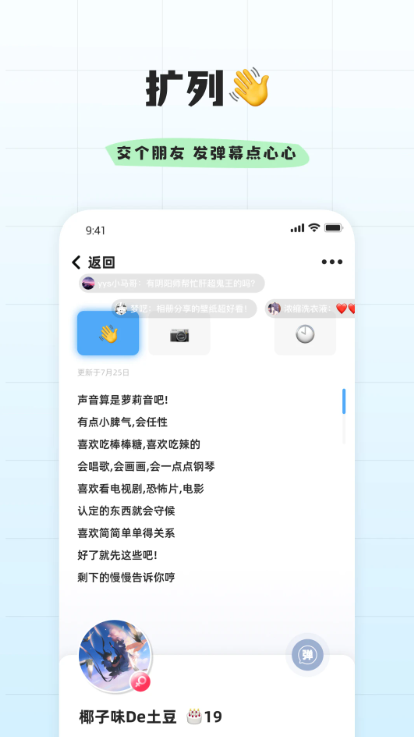
Expanded cards: Used to introduce yourself and express interests, such as "I like playing mobile games and watching anime."
Sound card: Displays the characteristics of the user's voice, such as "girly voice" and "uncle voice".
Album card: You can add selfies and life photos to share your personal life and enhance social authenticity.
Interactive and dynamic content:
It has a barrage wall, singing interaction, scene emoticons and other contents. Users can send barrages to say hello when the list is expanded, and get to know each other through singing and singing of their favorite songs.
Supports publishing video updates and social VCR, showing yourself and forming an active virtual social circle.
Virtual social interaction:
When chatting, the images of both parties can make intimate movements, situational expressions, and convey emotions.
Supports continuous clicks to send "super likes", mark cards to convey goodwill to the other party, and reduce social embarrassment.
Column expansion and matching:
Use the column expansion function to randomly match peers and view each other's avatar and card information.
You can search for nearby people or recommend friends based on interest tags to quickly expand your social circle.
Support "scan" to enter interactive games and get closer to others.
FAQ
How to register a Xingshi APP account?
Users need to use their mobile phone number to register an account, and must agree to the "User and Privacy Agreement" when registering. The agreement clearly stipulates user rights, responsibilities and privacy policy, and registration is deemed to be acceptance of the terms of the agreement.
What should I do if it prompts "Account has been banned" when logging in?
Account bans are usually caused by violations of community standards or laws and regulations. Users need to contact customer service to verify the reason for the ban. If they think the ban is wrong, they can submit appeal materials.
How to retrieve your forgotten password?
Click "Forgot Password" on the login interface and reset your password by receiving the verification code through your registered mobile phone number. If the mobile phone number has been deactivated, you need to contact customer service to provide identity proof materials to modify the binding information.
Xingshi update log:
1: Brand new interface, refreshing, simple and efficient
2: Performance is getting better and better
Huajun editor recommends:
The editor has also used software such as Painter Alliance, Voting Brush Expert, Cloud Machine Manager, etc. with similar functions to this software. Huajun Software Park provides them and can be downloaded and used!
Version: v3.1.1.1 | Update time: 2025-12-04
Similar recommendations







Latest updates





Use deepseek online www.deepseek.com _deepseek web version entrance
Cut the Rope Together 2 online play - Cut the Rope Together 2 web version entrance
Listen to soda music online www.qishui.com _Soda music web version entrance
Doubao online use www.doubao.com _Doubao web version login entrance
How to check for updates in Movie Paradise? -How to check for updates in Movie Paradise
How do I view my collection in Movie Paradise? -How to view collections in Movie Paradise
How to cancel the account in Movie Paradise? -How to cancel your account at Movie Paradise
Xingshi comments
Recommended products










- Diablo game tool collection
- Group purchasing software collection area
- p2p seed search artifact download-P2P seed search artifact special topic
- adobe software encyclopedia - adobe full range of software downloads - adobe software downloads
- Safe Internet Encyclopedia
- Browser PC version download-browser download collection
- Diablo 3 game collection
- Anxin Quote Software
- Which Key Wizard software is better? Key Wizard software collection




