
-
Excel column extractor combiner
- Size: 13.14MBM
- Language: Simplified Chinese
- Category: file splitting
- System: WinAll






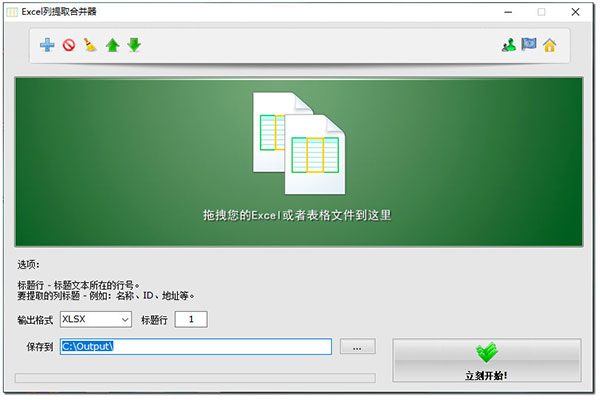
In our daily work, you may often encounter dozens or more Excel files. Each file contains the same type of information such as name, email, address, etc., but they are in different columns in different files. When you want to summarize or merge data, the workload of merging the same type of data in different tables is really not small. Are there software tools that can simplify the work of extracting the same type of column data from multiple tables and merging them into one Excel table and file?
You can use the Excel column extractor combiner. Excel Column Extraction Merger is an Excel table data extraction and merging tool under the Windows platform. It can extract all the data of a certain column or several columns of multiple excel files at one time, and then merge them into one Excel table. You can set the column headers to be extracted and the row number of the column headers (usually the first row) according to the type of extraction you need.
If you want to extract all the data from all files and merge it into one table, just leave the column header unfilled in the Excel column extractor merger and leave it empty.
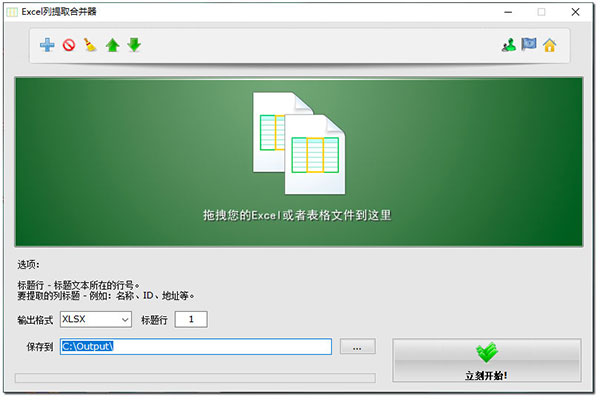
Excel column extractor combinerSoftware features
- Extract specified columns from multiple Excel tables and merge them into one table
- Merge all contents of multiple Excel tables into one table
- You can set the row where the column title is located
- Adjustable file extraction order
- Supports XLSX, XLS, CSV, ODS, XML and other formats
- Multilingual
Excel column extractor combinerSoftware usage tutorial
There are 2 Excel files below, 1.xlsx and 2.xlsx. Follow the steps to extract Contact E-mail, Contact from these 2 Excel files City and Contact Country data and merge them into a new worksheet.
1. Add Excel file to file list
Drag the 2 Excel files to the Excel Column Extract Merger file list to add them, or click the "Add" button and select the files from the dialog box.
2. Enter the column title
Enter the column headers you want to extract in the "Column headers to extract" list. Here we type "Contct E-mail", "Contact City" and "Contact Country".
3. Start extracting data
Click the "Start Now" button and the program will start working immediately. After the operation is completed, you can get the extracted and merged data in the new worksheet below.
Excel column extractor combinerSoftware update log
Sweep the bug out and carry it out to the end
Optimize user feedback issues and improve detailed experience
Huajun editor recommends:
The Excel column extraction and merge software is a software with excellent performance. It is obvious to all. Huajun Software Park also has txt text cutter, cloud machine manager, cloud machine manager and other related software that are definitely worth downloading and using. Come and choose your favorite!
Version: 1.1 | Update time: 2024-12-30
Similar recommendations







Latest updates




How to choose file association in Video Pioneer? - How to select file associations for Video Pioneer
How to download movies from Video Pioneer? - How to download movies from Video Pioneer
How to search for videos on Video Pioneer? - How to search for videos by Video Pioneer
How to delete history in Video Pioneer? -How to delete history records by Video Pioneer
How to set the skin for Video Pioneer? -How to set skin for Video Pioneer
Excel Column Extraction Merger Review
Recommended products








- Diablo game tool collection
- Group purchasing software collection area
- p2p seed search artifact download-P2P seed search artifact special topic
- adobe software encyclopedia - adobe full range of software downloads - adobe software downloads
- Safe Internet Encyclopedia
- Browser PC version download-browser download collection
- Diablo 3 game collection
- Anxin Quote Software
- Which Key Wizard software is better? Key Wizard software collection




