
-
MKVToolnix
- Size: 30.61M
- Language: Simplified Chinese
- Category: video editing
- System: win7 and above






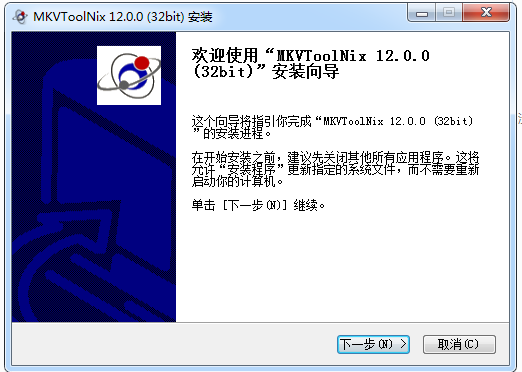
MKVToolnixIt is a set of powerful mkv (Matroska) format production and processing tools. MKVToolnix supports a variety of video, audio,subtitlesand other formats are encapsulated into mkv format. MkvToolnix contains a graphical interface program mmg.exe, which enables the productionmkvMore simple and intuitive. It is a set of powerful mkv (Matroska) format production and processing tools that supports packaging a variety of video, audio, subtitle and other formats into mkv format. Mkvtoolnix is currently the most complete Matroska synthesizer. In addition to WMV and MPEG-1/2, it can synthesize almost all media into MKV.Huajun Software Park provides you with free downloads. Friends who like MKVToolnix come to Huajun Software Park to download and experience it!
MKVToolnixSoftware Highlights
Compatibility
Supported formats: video (H.264/AVC, MPEG-4, RealMedia, etc.), audio (MP3, AC3, AAC, FLAC, etc.), subtitles (SSA/ASS, SRT, SUB, etc.).
Container support: All mainstream media formats except WMV and MPEG-1/2 can be encapsulated into MKV.
Performance optimization
Efficient processing: Use multi-threading technology to accelerate encapsulation, extraction and editing operations.
Low resource usage: Little impact on system performance when running in the background.
Repair function
Packaging error repair: Detect and repair corrupted MKV file structures.
Audio and video synchronization adjustment: Correct subtitle or audio out-of-sync issues through delay parameters.
MKVToolnixSoftware introduction
The software integrates multiple core components, including command line tools such as mkvmerge (for encapsulation/merging), mkvextract (for track extraction), mkvpropedit (for attribute editing), and provides graphical interfaces mmg.exe and MKVExtractGUI.exe to simplify the operation process. Users can use these tools to encapsulate multimedia tracks such as video, audio, and subtitles into a single MKV file, and can reversely extract the track data and restore it to the original format.
MKVToolnixSoftware function
mkvmerge: Encapsulate, merge, and mix multimedia files into MKV files;
Multi-platform support: Can run on multiple operating systems such as Windows, macOS, and Linux to meet the needs of different users.
Rich functions: Supports operations such as merging, separating, and converting video and audio tracks, as well as adding, modifying, or deleting subtitles.
Lossless processing: When processing video files, the quality and integrity of the original files can be guaranteed, and the video quality can be preserved without re-encoding.
Wide compatibility: Supports mainstream media formats except WMV and MPEG-1/2, such as H.264, AAC, MP3, etc., and has functions such as repairing packaging errors and adjusting audio and video synchronization.
Efficient and convenient: Provides batch processing operations to greatly improve work efficiency. At the same time, its user interface is friendly and supports command line operations, making it suitable for users of different levels.
MKVToolnixSoftware features
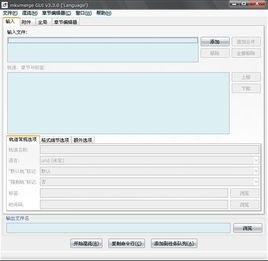
1. After running mmg.exe, the graphical interface of the software will pop up. First select the "Input" selection card and click the "Input" button in the upper part. files" to add the video, audio, and subtitle files to be merged to the file list one by one. The power of Mkvtoolnix is mainly reflected in the formats it can import. In addition to MPEG video, it can accommodate almost all mainstream audio and video formats, including OGM and MKV formats themselves!
2. Track settings
If the video already contains audio, you can also choose whether to keep the audio or not! If you want to remove the original audio, first select the video file in the file list, and then remove the check mark in front of the audio track in the Tracks list below. Such a function is much more convenient than OGM! All tracks can be marked with language type, title, author, etc. First select a track, and then click "Track" below. Select from the "Language" drop-down list at "Options". When the subtitles or sounds are out of sync, you can also set the delay time for the sound track and subtitle playback, and fill the delay value into the text box after Delay (in milliseconds).
3.File splitting
If you want to burn the merged MKV files to a disc, and the final merged files may exceed the capacity of the disc, you can split the files. Select the "Global" tab and check "Enable" in the "Split" column. splitting (split)", there are two ways to split: "by size (according to file size)", "by time (by time)", of course it should be by size, the specific size can be selected from the drop-down list behind.
4.Output
The other tabs in the interface are irrelevant and can be ignored. Finally, in the following "Output After setting the path and name of the output file in "filename (output file name)", click "Start" Muxing (start merging)" button to output MKV files. In addition, Mkvtoolnix can also be used to separate MKV files. Just import the MKV files and then name each stream separately and output it.
MKVToolnix FAQ
What platforms does MKVToolNix support?
Operating System: Windows, Linux, macOS (install via Homebrew or MacPorts).
Deployment method: Supports local installation, Docker container or Microsoft Store version (GUI only, no command line tools).
How to resolve permission issues in Docker containers?
Match user ID: Set the environment variables PUID and PGID to make the user permissions in the container consistent with the host user.
Modify directory permissions: Run chmod -R 775 /home/user on the host to make sure the container is readable and writable.
MKVToolnix update log
1.Fix some bugs
2. Optimized some functions
Huajun editor recommends:
The editor of MKVToolnix personally tested this software. The various functions are very simple and easy to operate. Even a new user like the editor can quickly master it. Big praise! This site also has similar software such as CD to MP3 format converter, .NET, and Cloud Machine Manager, which we recommend you download!
Version: 94.0 | Update time: 2025-08-20
Similar recommendations






Latest updates





MKVToolnix Review
-
1st floor Huajun netizen 2022-12-28 12:28:42MKVToolnix is very useful, thank you! !
-
2nd floor Huajun netizen 2022-12-07 03:29:01MKVToolnix interface design is easy to use and has rich functions. I highly recommend it!
-
3rd floor Huajun netizen 2022-12-06 23:10:18MKVToolnix is awesome! 100 million likes! ! !
Recommended products









- Diablo game tool collection
- Group purchasing software collection area
- p2p seed search artifact download-P2P seed search artifact special topic
- adobe software encyclopedia - adobe full range of software downloads - adobe software downloads
- Safe Internet Encyclopedia
- Browser PC version download-browser download collection
- Diablo 3 game collection
- Anxin Quote Software
- Which Key Wizard software is better? Key Wizard software collection




