
-
DocFetcherMAC
- Size: 74.17M
- Language: Simplified Chinese
- Category: application
- System: Mac OS X






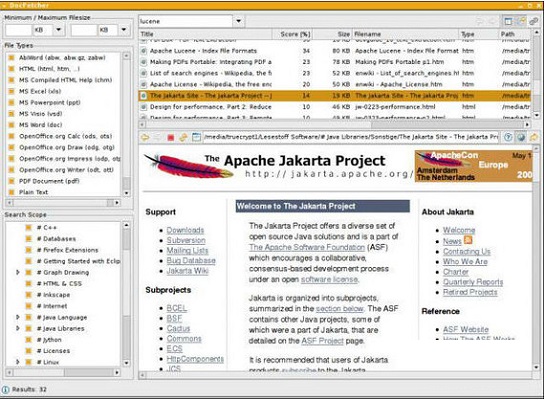
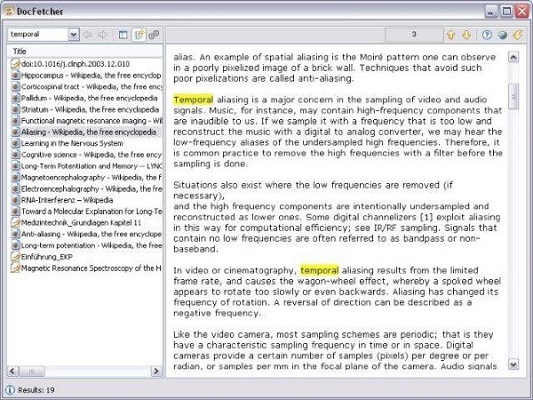
DocFetcherMACThe latest version is a file search software specially built for mac users, DocFetcher The latest version of MAC can search all your file contents, and can also perform full-text search. Just enter the keyword of the file content to find the file. DocFetcher MAC version includes Microsoft Office, OpenOffice.org, PDF, HTML, RTF and plain text files.
Things to note:
Friends who use Mac to install or download application software often encounter the following three error situations. The editor here provides you with solutions to help you solve the Mac error problem:
1. "...the software is damaged and cannot be opened. You should move it to the Trash"
2. "The xxx software cannot be opened becauseApple can't check if it contains malware"
3. "Cannot open xxxsoftware because it comes from an unidentified developer"
Don’t panic if you encounter the above three situations, follow the editor’s instructions and solve them easily.
1. Turn on any source in the computer settings.Open any source.
2. Opening any source will solve the problem of most software error reports. If it does not work, it means that you need to bypass application signature authentication by executing command line code. Execute command bypassiosnotarizationGatekeeper.
3. If the above operations still cannot solve the problem, then you need tocloseSIPSystem integrity protectionOnly then can.
DocFetcher MAC software introduction
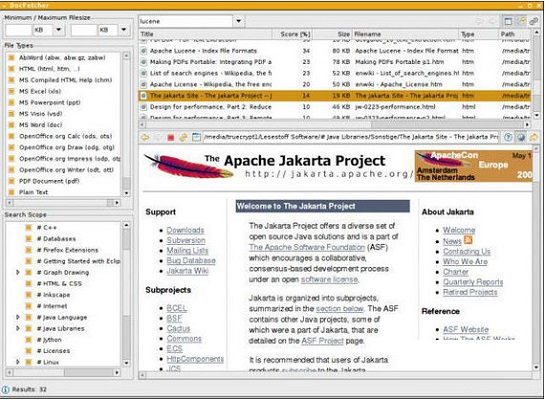
Docfetcher is a local data search software that indexes file content. It builds an indexing system by scanning all file contents in a specified folder. It can traverse all your file contents and conduct full-text searches like Baidu on your local hard drive. After the scan is created, even if you don't remember the file name, you can enter the keywords in Doc or TXT files in the search bar to search for the document title, address, size and other information. You can also preview the entire content on the lower right side to easily find the local data files you need!
DocFetcher MAC software features
You can think of DocFetcher Mac version as a search engine for your local files. DocFetcher is available on Windows, Linux and Mac OS X run on. A portable version of desktop search with full Uni support for all supported file formats code. It can read the following decompressed file formats: .zip, .7z, .rar, and .tar, and supports searching of multiple email file formats.
DocFetcher MAC function introduction
1. Portable version
There is a portable version of DocFetcher that runs on Windows, Linux and OS X.
2. 64-bit support
Supports 32-bit and 64-bit operating systems.
3. Unicode support
DocFetcher provides solid Unicode support for all major formats, including Microsoft Office, OpenOffice.org, PDF, HTML, RTF and plain text files.
4. Archiving support
5. DocFetcher supports the following archive formats
zip, 7z, rar and the entire tar.* series. The extension of zip archive files can be customized, allowing more zip-based archive formats to be added as needed. Furthermore, DocFetcher can handle unlimited nesting of archives (e.g. zip archives containing 7z archives, zip archives containing rar archives...) and more.
6. Search in source code files
The file extensions DocFetcher recognizes for plain text files can be customized, so you can use DocFetcher to search in any type of source code and other text-based file formats. (This works well in conjunction with custom ZIP extensions, such as searching for Java source code in JAR files.)
7. Outlook PST file
DocFetcher allows searching Outlook emails, which Microsoft Outlook usually stores in PST files.
8. Detect HTML pairs
By default, DocFetcher detects pairs of HTML files (for example, a file named "foo.html" and a folder named "foo_files") and treats the pair as a single document. This feature may seem rather useless at first, but it turns out that this greatly improves the quality of search results when working with HTML files, since all the "clutter" inside the HTML folder disappears from the results.
Exclude files from the index based on regular expressions: You can use regular expressions to exclude certain files from the index. For example, to exclude Microsoft For Excel files, you can use the following regular expression: .*xls
9. Mime-type detection
It is possible to turn on "mime-type detection" for certain files using regular expressions, which means DocFetcher will try to detect their actual file type by not only looking at the file name, but also by looking at the file content. This is useful for files with the wrong file extension.
10. Powerful query syntax
In addition to basic structures such as OR, AND and NOT DocFetcher also supports: wildcards, phrase search, fuzzy search ("Find words similar to..."), proximity search ("These two words should be at most 10 words apart"), enhancement ("in"). Increase the score of documents containing "..."
FAQ
The interface language is not Chinese
Solution: DocFetcher may not support the Chinese interface. Users can try to find out if a Chinese language pack or plug-in is available, or change the interface language by modifying the configuration file (if the software supports this feature). However, it should be noted that not all versions of DocFetcher provide Chinese language support.
Setting options are unclear or cannot be changed
Solution: Consult DocFetcher's official documentation or help file to understand the specific meaning and usage of each setting option. If a setting option is unclear or cannot be changed, it may be due to a software version or permissions issue. Users can try to update the software to the latest version or contact the software developer for help.
DocFetcher MAC update log
1.Fix several bugs;
2. Optimize detailed issues;
Huajun editor recommends:
DocFetcher MAC is a conscientious product with guaranteed performance. I personally tested it and I believe you can try it on my children’s shoes! Our Huajun Software Park also has more useful software CrossOver Pro For Mac, .NET, and Cloud Machine Manager!
Version: 1.1.22 | Update time: 2025-12-01
Similar recommendations







Latest updates





DocFetcher MAC Review
-
1st floor Huajun netizen 2022-05-28 20:42:35DocFetcher MAC is very useful, thank you! !
-
2nd floor Huajun netizen 2022-05-22 19:21:12DocFetcher MAC interface design is easy to use and has rich functions. I highly recommend it!
-
3rd floor Huajun netizen 2022-05-16 09:10:53The overall feeling of DocFetcher MAC is good, I am quite satisfied, the installation and operation are very smooth! It went very smoothly following the installation step-by-step guide!
Recommended products








- Diablo game tool collection
- Group purchasing software collection area
- p2p seed search artifact download-P2P seed search artifact special topic
- adobe software encyclopedia - adobe full range of software downloads - adobe software downloads
- Safe Internet Encyclopedia
- Browser PC version download-browser download collection
- Diablo 3 game collection
- Anxin Quote Software
- Which Key Wizard software is better? Key Wizard software collection




