
-
360 cloud disk synchronization version MAC
- Size: 8.78M
- Language: Simplified Chinese
- Category: Network tools
- System: Mac OS X







The latest version of 360 Cloud Disk Sync Edition MAC is a cloud disk service software on the Mac platform. 360 Cloud Disk Sync Edition MAC provides a wealth of file storage and backup services for individuals and enterprises. 360 Cloud Disk Sync Edition MAC software can provide users with convenient storage of personal data and provide convenient collaborative services such as file sharing and member management for small and medium-sized enterprises, company teams, family and friends. Friends who like the 360 cloud disk synchronization version for MAC, please come to Huajun Software Park to download and experience it!
Things to note:
inmacWhen downloading and installing software, you will generally encounter the following three error situations. Now the editor of Huajun will give you the answers. If you encounter errors, please read them carefully:
1."...The software is corrupted and cannot be opened. You should move it to the Trash"
2."Can't open...software because it comes from an unidentified developer"
3."Can't open...software becauseAppleUnable to check if it contains malware"
When encountering the above three situations, we should:
1. First set:Open any source
2, most software settings can be downloaded and installed normally after opening any source; a small number of softwareiosRestrictions on unsigned application permissions require the execution of command line code to bypass application signature authentication. Therefore it is necessary to:Execute command bypassiosnotarizationGatekeeper.
3. If none of the above operations can solve the problem, then you need to:closeSIPSystem integrity protection.

360 cloud disk synchronization version MACFunction introduction
File storage and backup
Large-capacity storage: Provides initial free storage space, and users can expand the capacity by completing tasks or inviting friends to meet daily file storage needs.
Automatic backup: Supports automatic uploading to the cloud when local files change, and can back up desktop files with one click to prevent data loss.
Historical version recovery: Users can apply to retrieve historical file versions to avoid data loss caused by misoperation.
Multi-terminal synchronization
Files are automatically uploaded and downloaded, enabling real-time synchronization of files between Mac, Windows, mobile phones and other devices to ensure file consistency.
Supports selecting specific folders for synchronization to avoid downloading all files to the local computer when there are too many network disk files, saving local space.
File sharing and permission management
Flexible sharing: Supports generating file or folder links and quickly sharing via social media, email, etc. The recipient can access without registering.
Permission management: Shared folders can be set with member permissions (such as viewing, editing, downloading) to ensure file security.
Team collaboration: Supports creating teams and allocating space. Members can share files and collaborate on editing to improve work efficiency. Shared files are automatically locked during online editing to prevent conflicts.
Intelligent management
Provides a "My Files" interface that supports file upload, download, move, copy, delete and other operations, and can quickly locate files through search.
Toolbox: Integrate safe, clean up duplicate files, apply for invoices and other functions to improve user experience. The safe function needs to be used by administrators to ensure the safety of sensitive files.
Recycle Bin: Accidentally deleted files will enter the Recycle Bin, but the Recycle Bin also takes up space and needs to be cleaned regularly to free up space.
Online preview and editing
Built-in WPS support, you can directly preview documents, pictures, videos and other files in hundreds of formats without downloading special software.
Supports online editing of documents, automatically saves historical versions, and supports one-click backtracking.
360 cloud disk synchronization version MACSoftware Highlights
individual user
Store personal files such as photos, videos, and documents for seamless access across multiple devices.
Share files with family and friends via shared links without worrying about transfer limits.
Enterprise users
Provide enterprise-level security protection, support team collaboration and permission management, and meet compliance requirements.
Multi-location redundant backup and quick recovery functions ensure business continuity.
Teamwork
Supports real-time collaborative editing of documents by multiple people, automatically saves historical versions and supports one-click retrieval.
Centralize file management through team folders to improve work efficiency.
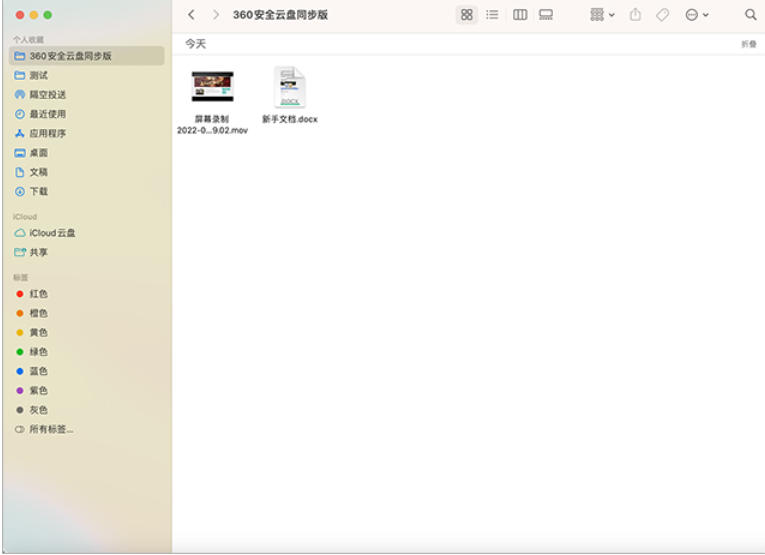
360 cloud disk synchronization version MACSoftware features
Extremely fast transmission
File upload and download enjoy extremely high-speed transmission without speed limit, greatly improving work efficiency.
Data safe storage
Encrypted storage: Use block encryption storage technology to ensure data security.
Off-site backup: Data is stored redundantly in multiple computer rooms to prevent data loss caused by single point failure.
Security monitoring: Monitor system activities around the clock to detect and deal with potential security threats in a timely manner.
Privacy protection: Strictly comply with data protection regulations, user data is stored independently and is not associated with personally identifiable information.
Cross-platform support
Covering Mac, Windows, Android, iOS and web pages, it supports offline access to cache files to meet the needs of multiple scenarios.
Convenient operation
The interface is simple and intuitive, continuing Mac operating habits, and novice users can get started quickly.
Supports convenient operations such as drag-and-drop upload and right-click menu integration to improve file management efficiency.
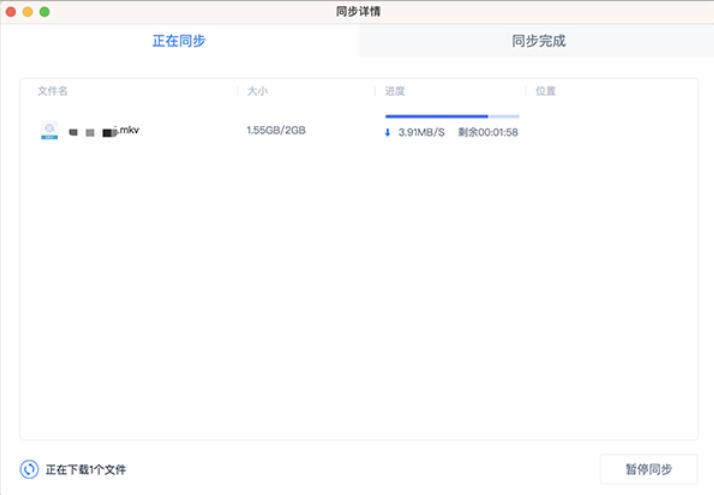
360 cloud disk synchronization version MACInstructions for use
1. After the information is loaded, you will enter the file management interface, where you can upload local files, create new folders, delete, rename, move files, etc.
2. If you have not purchased or the package has expired, you need to purchase the package or renew to use the cloud disk
3. Click on the personal avatar to view personal information. If the account has multiple spaces, you can switch spaces.
4. Transfer list, you can view the uploading, downloading, and transfer completion information, and manage it
5. The toolbox has more functions to give you a more intimate experience. Only administrators can use the safe
6. Recycle bin files also take up space. You can clean them on the web page.
7. In the top menu bar, you can set the file download path. After checking Default, the downloaded file will be saved to the set path by default.
Frequently Asked Questions about 360 Cloud Disk Synchronization Version for MAC
Sync error:
Possible reasons: Insufficient cloud disk controls, interruptions during synchronization (such as exit, shutdown, restart, etc.), network problems, etc.
Solution:
Make sure there are no interruptions during synchronization.
Close the software on your computer that is taking up network speed, log in to 360 Cloud Disk again, and upload the file again.
After uninstalling, reinstall the latest 360 cloud disk.
Files occupy local space:
Problem description: The 360 cloud disk under Mac is actually a synchronization disk, which will synchronize specific directories on the computer and occupy computer space.
Solution: If you do not need to synchronize all files, you can set a synchronized folder to avoid downloading all files to the local computer when there are too many network disk files.
360 cloud disk synchronization version MAC update log
The developer of GG said that there are really no bugs this time~
Huajun editor recommends:
What? I haven’t used the 360 cloud disk synchronization version for MAC yet. Do you know that all your good friends are using it? Come and download it. The editor also prepares Windmill Signature, Course Opening Cloud, and CrossOver Pro For Mac for you.
Version: 3.0.5 | Update time: 2025-12-02
Similar recommendations






Latest updates





How to delete history in Video Pioneer? -How to delete history records by Video Pioneer
How to set the skin for Video Pioneer? -How to set skin for Video Pioneer
How to upgrade software in 360 Software Manager? -How to upgrade software in 360 Software Manager
How to draw a lottery in 360 Software Butler - How to draw a lottery in 360 Software Butler
360 cloud disk synchronization version MAC review
-
1st floor Huajun netizen 2022-04-25 23:22:07360 cloud disk synchronization version MAC software is very easy to use, the download speed is very fast, and it is very convenient!
-
2nd floor Huajun netizen 2022-04-15 02:52:13The 360 cloud disk synchronization version for MAC is not bad, the download is very fast, I give you a good review!
-
3rd floor Huajun netizen 2022-04-14 13:47:27360 cloud disk synchronization version for MAC is convenient and practical, very powerful, the software is very easy to use!
Recommended products







- Diablo game tool collection
- Group purchasing software collection area
- p2p seed search artifact download-P2P seed search artifact special topic
- adobe software encyclopedia - adobe full range of software downloads - adobe software downloads
- Safe Internet Encyclopedia
- Browser PC version download-browser download collection
- Diablo 3 game collection
- Anxin Quote Software
- Which Key Wizard software is better? Key Wizard software collection




