
-
Cutting
- Size: 628M
- Language: Simplified Chinese
- Category: video editing
- System: win7 and above







Cut-out computer versionIt is a very popular shortvideo productionTools. The latest version of Jianying is rich in resources and provides users with a one-stop video production process to help users easily edit and record beautiful moments in life.Cut-out computer versionSupport multi-trackAudio and videoediting, as well as the professional curve speed change effect added with one click, users can quicklyEditProcess video content and share it. Friends who like it, come to Huajun Software Park to download and experience it!
Features of the computer version software
Scenario template library
It has built-in 2000+ templates in vertical fields, covering "store exploration vlog", "knowledge popularization", "drama short film", etc. Users can generate exclusive works by replacing the materials.
Dynamic template technology: The "intelligent adaptation template" launched in 2025 can automatically adjust the text position and animation rhythm according to the video content to avoid material misalignment.
User co-creation plan
Creators can receive a share of traffic by uploading templates, and top template creators earn over one million yuan annually. For example, the "movie-like transition template" has been used more than 1 billion times.
Highlights of the computer version
Cross-platform support
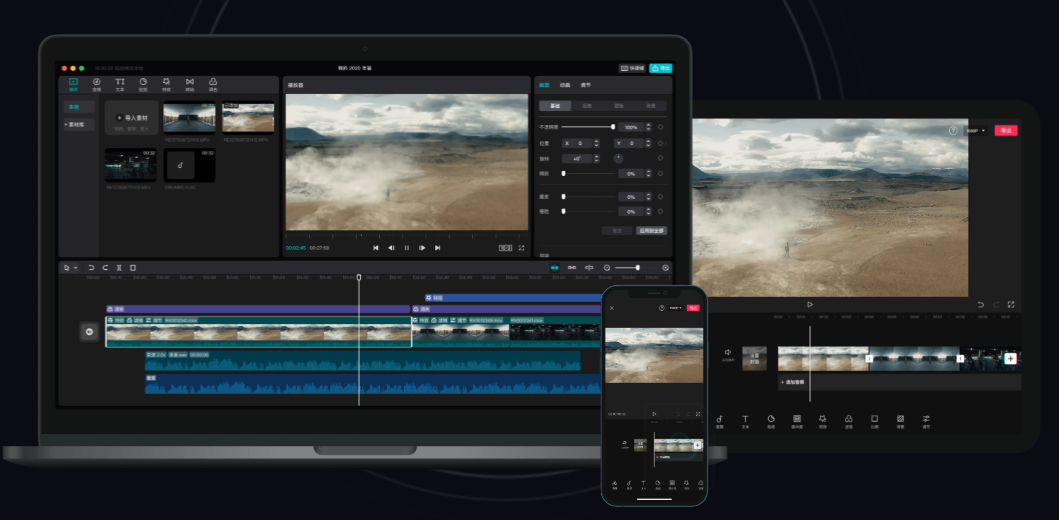
It supports multi-terminal use on Android, Apple, and web versions. Drafts on mobile phones, tablets, and PCs are interoperable, and you can create anytime and anywhere.
Cloud collaboration
Team members can edit the same project in real time, and historical versions can be traced back indefinitely to avoid material loss.
Live clip
The live broadcast is recorded in real time, and a collection of highlights is automatically generated 5 minutes after the end, which is suitable for e-commerce live broadcasts, knowledge sharing and other scenarios.
Dialect dubbing
It has built-in 20 dialect AI voices, such as "You Guawazi" in Sichuan dialect, which automatically matches funny stickers to make the content more interesting.
National trend special effects
Cooperated with the Forbidden City and Dunhuang to launch the "Ancient Style Filter", which can transform modern scenes into ink painting style with one click to meet the needs of cultural communication.
E-commerce tools
The product link is directly embedded in the video. Click to jump to the WeChat applet or Taobao store. The conversion link is shortened to 3 steps to help monetize the product.
Highlights of the computer version
Cross-platform support
It supports multi-terminal use on Android, Apple, and web versions. Drafts on mobile phones, tablets, and PCs are interoperable, and you can create anytime and anywhere.
Cloud collaboration
Team members can edit the same project in real time, and historical versions can be traced back indefinitely to avoid material loss.
Live clip
The live broadcast is recorded in real time, and a collection of highlights is automatically generated 5 minutes after the end, which is suitable for e-commerce live broadcasts, knowledge sharing and other scenarios.
Dialect dubbing
It has built-in 20 dialect AI voices, such as "You Guawazi" in Sichuan dialect, which automatically matches funny stickers to make the content more interesting.
National trend special effects
Cooperated with the Forbidden City and Dunhuang to launch the "Ancient Style Filter", which can transform modern scenes into ink painting style with one click to meet the needs of cultural communication.
E-commerce tools
The product link is directly embedded in the video. Click to jump to the WeChat applet or Taobao store. The conversion link is shortened to 3 steps to help monetize the product.

Cutting PC version software functions
AI-powered creative assistance
Script generation: Enter keywords, and AI outputs storyboard scripts and line suggestions (such as "Fitness Tutorial" automatically generates action breakdowns and motivational quotes).
Automatic soundtrack: matches the music style according to the mood of the video (joyful/sad), and supports one-click commercial use of copyrighted music libraries.
Intelligent film review: Automatically detect problems such as black edges on the screen and out-of-sync audio and video, and output optimization suggestions.
Performance optimization
Lightweight architecture: The APP installation package is only 350MB, while competing products with the same functions generally exceed 1GB.
Offline editing: basic functions can still be used in no network environment, suitable for outdoor workers.
Advantages of computer version software
Simple operation and friendly interface
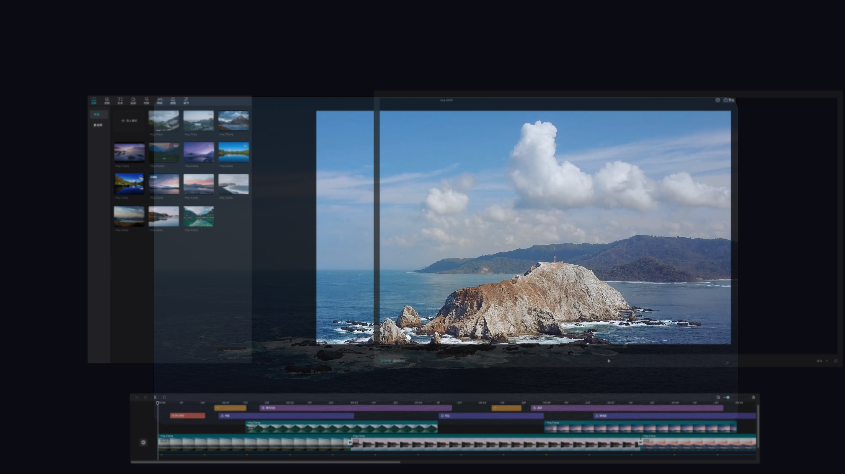
The interface design of Cutting is simple and intuitive, with clear functional layout. Users can get started quickly without professional editing knowledge. Adding, moving and editing of materials can be completed through drag and drop operations, lowering the threshold for video creation.
Comprehensive and powerful
Editing function: Supports basic operations such as video cutting, speed changing, reverse playback, and transitions to meet the diverse editing needs of users.
Special effects production: Provides a wealth of filters, transition effects, animations, etc., allowing users to easily add visual impact to videos.
Intelligent assistance: Equipped with functions such as intelligent editing, intelligent subtitles, and voice recognition, it greatly improves creative efficiency. For example, smart subtitles can automatically recognize speech in videos and generate subtitles, saving time on manual input.
Rich material library: Built-in massive music, sound effects, fonts, stickers and other materials, users can freely choose and use them to enrich video content.
Multi-platform support, collaborative creation
The clipping supports multiple terminals such as mobile phones, tablets, and computers, and project files can be synchronized across platforms, making it convenient for users to create anytime and anywhere.
Team members can collaborate on editing the same project in real time, with unlimited retrieval of historical versions to avoid material loss and improve team collaboration efficiency.
Installation steps of computer version of Clip Image
1. Download the clipped installation package from Huajun Software Park. After unzipping, double-click the exe program to enter the installation interface.

2. The software is being installed, users please wait patiently.

3. The installation of the video clip is completed, click to experience it now

Frequently Asked Questions about the computer version of Clip Screen
How to add subtitles and dubbing to cuts?
Open the clip, start creating, and select a video.
You can first import a material and click on the text inside.
Select the corresponding style and finally enter the text.
Click Add Audio or click Audio in the menu bar.
Enter the audio operation page and select dubbing.
After adding, if the starting position of the background sound is not at the beginning.
You can drag the dubbed clip to the beginning.
In this way, the background sound starts synchronizing with the video, and the background sound is added.
How to cut out unnecessary parts in film editing?
After entering the software, first select the video we need to edit.
Then click "Add to Project" to place the video on the workbench.
Then we click on the clip and then slide the progress bar of the video.
Click "Split" on the unwanted video section.
Then select the range and click "Delete".
How to remove the watermark from the computer version of Cutout
1. Please click the "Start Creation" button in the displayed interface to start the creation process.
2. In the default video editing mode of the software, please click the "Import Material" option in the upper left corner and select the video file that needs to be watermarked from your computer.
3. Drag the successfully imported file to the video track below the software interface for subsequent editing operations.
4. By default, the video file will be at the starting position. At this time, please click the "Crop" icon in the lower right corner of the interface to enter the video cropping process.
5. By pulling the progress bar of the video, you can adjust the area cropped by the software. Make sure to completely crop out the content where the watermark should be, then click the OK button to apply the changes.
Recommended software of the same type as the computer version of Cutting
Corel VideoStudioA feature-rich video editing software released by the Canadian company Corel. VideoStudio 2023 is easy to use with unprecedented power, including drag-and-drop titles, transitions, overlays and filters, color grading, dynamic split-screen video and a newly enhanced mask creator that goes beyond basic editing to achieve cinematic effects. Optimize the split-screen editing function, simplify the workflow of multi-timeline editing, and make creation easier.Download address:http://softwaredownload4.com/soft/578014.htm
Love editing official versionIt is a professional and practical video editing and production tool. The official version of iClip not only allows you to easily edit and create videos, but also supports the free combination of massive image effects and rich text editing methods. It also has 2000+ pictures, MV filter effects, FX, animation effects and other beautification options to choose from. Moreover, iEdit also supports complete editing functions such as subtitles, color correction, and photo frames for videos, as well as many innovative functions and cinema-level special effects.
Download address:http://softwaredownload4.com/soft/579886.htm
PC version update log
The developer of GG said that there are really no bugs this time~
Huajun editor recommends:
After many updates and optimizations, the computer version of Cutting has become more user-friendly and easier to operate. The editor of Huajun Software Park personally tested it and recommends it to everyone for download. Interested friends can also download Video Clip Format Factory, .NET, and Cloud Machine Manager.
Version: 9.5.0 | Update time: 2025-12-01
Similar recommendations






Latest updates





Clip review
-
1st floor Huajun netizen 2022-01-21 21:37:32The computer version of the clipping is very useful, thank you! !
-
2nd floor Huajun netizen 2022-03-31 08:54:08The interface design of the computer version of Cutting is very easy to use and has rich functions. I highly recommend it!
-
3rd floor Huajun netizen 2022-02-02 21:50:42The computer version of the video editing software is very easy to use, the download speed is very fast, and it is very convenient!
Recommended products









- Diablo game tool collection
- Group purchasing software collection area
- p2p seed search artifact download-P2P seed search artifact special topic
- adobe software encyclopedia - adobe full range of software downloads - adobe software downloads
- Safe Internet Encyclopedia
- Browser PC version download-browser download collection
- Diablo 3 game collection
- Anxin Quote Software
- Which Key Wizard software is better? Key Wizard software collection




