Global Online School is a professional mobile learning platform for vocational examinations. It brings together a large number of selected courses, covering many fields such as construction engineering, finance and finance, vocational qualifications, medicine and health, academic qualifications and postgraduate entrance examinations, to meet the examination preparation needs of different users. The feature of the software is that it provides a teaching mode that combines high-definition recording and interactive live broadcasting, and supports offline downloading, allowing you to use fragmented time to study anytime and anywhere. At the same time, the App integrates powerful functions such as intelligent question banks, past papers, and online mock tests. It uses big data to analyze learning weaknesses and achieve personalized and precise practice. Coupled with an experienced team of famous teachers and considerate class teacher services, we provide all-round protection for your learning path, helping you prepare for the exam efficiently and pass the test easily. Next, let the editor of Huajun explain to you how to clear the cache of Global Online School and how to clear the cache of Global Online School!
first step
Open Global Online School APP

Step 2
Find and click the "My" option in the bottom navigation bar to enter the personal center page.

Step 3
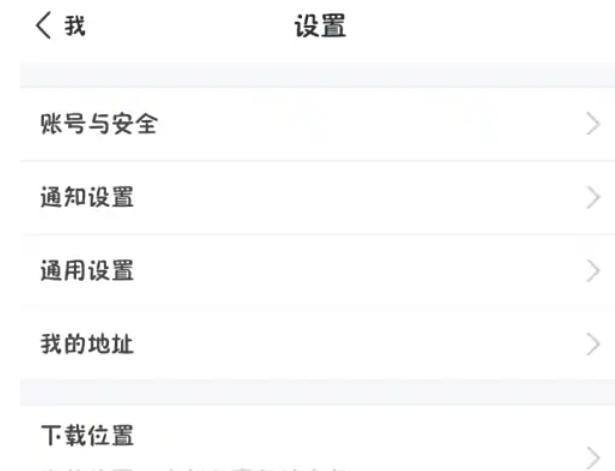
In the upper right corner of the personal center page, find and click the settings icon (usually a small gear-shaped icon) to enter the settings page.
Step 4
On the settings page, find and click the "Clear Cache" option. The system will pop up a prompt window asking whether to confirm clearing the cache.

Step 5
In the prompt window, click the "OK" button to complete the cache cleanup.

The above is what the editor of Huajun compiled for you on how to clear the cache of Global Online School and the methods of clearing cache of Global Online School. I hope it can help you!