mt Manager is one of the most popular file management tools and APK reverse modification artifacts at the moment. So how does mt Manager extract the installation package? How to extract the installation package with mt manager? Let the editor give you the answer below!
How to extract the installation package from mt manager?
1. Open MT Manager: After starting the application, enter its homepage. The homepage usually displays two file list windows on the left and right. This is the iconic dual-window operation mode of MT Manager.
2. Enter the installation package extraction function: click the three horizontal lines button (or "three lines") in the upper left corner, find and click the "Installation Package Extraction" option in the expanded function menu, and enter the corresponding page.
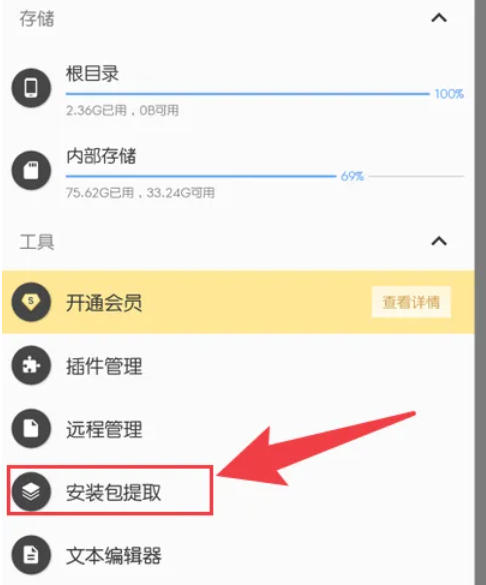
3. Select the application to be extracted: On the installation package extraction page, browse and find the application whose installation package needs to be extracted, and click the application name.
4. Extract the installation package: Click the "Extract installation package" option, and MT Manager will begin to extract the installation package of the selected application.
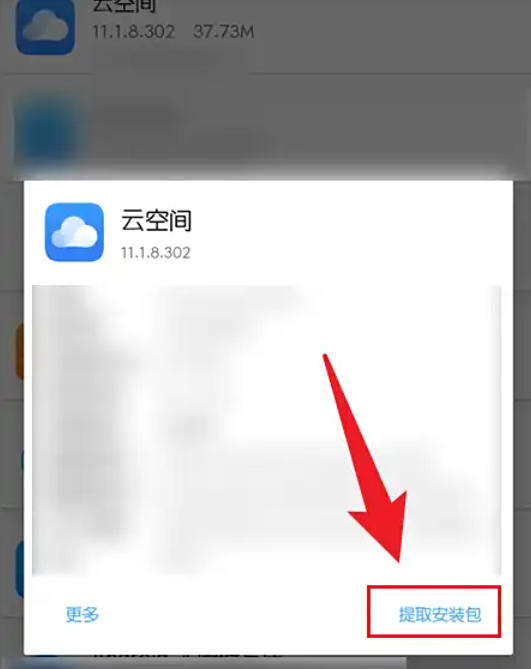
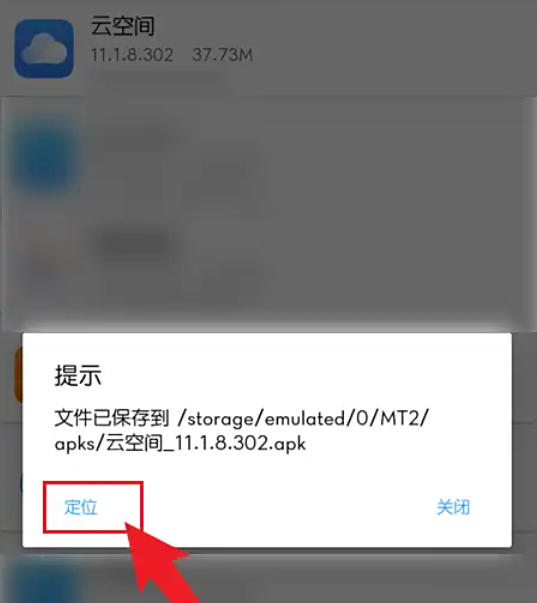
5. Locate the extracted installation package: After the extraction is completed, click the "Locate" button, and the MT Manager will automatically jump to the folder where the installation package is located. At this time, you can view or manage the extracted installation package files.
The above is what Huajun editor compiled for you. How to extract the installation package of mt manager? Here is how to extract the installation package from mt manager, I hope it can help you.