Microsoft Excel 2016 is a powerful spreadsheet processing software launched by Microsoft and is an important part of the Microsoft Office 2016 office suite. As one of the most popular spreadsheet tools in the world, Excel 2016 is widely used in fields such as data analysis, financial calculations, charting, and business management. This version introduces a number of innovative features, such as "Forecast Worksheet" that automatically generates trend forecasts based on historical data, "Power Query" that simplifies the data acquisition and organization process, and the "3D Map" function that visualizes data as a dynamic three-dimensional map. Next, let Huajun editor explain to you how to insert a histogram in Excel 2016 and how to insert a histogram in Excel 201!
first step
Double-click on the computer desktop to open the Excel 2016 software. Click the "Blank Workbook" option in the interface to create a new workbook.

Step 2
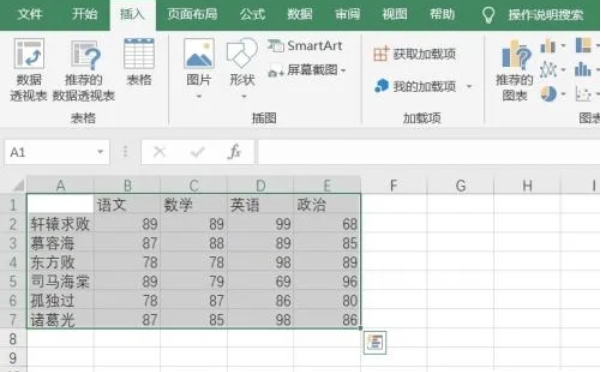
In the newly created workbook, enter the relevant data content that needs to be made into a histogram. Select the cell range that contains the data that needs to be operated.

Step 3
Click the [Insert] tab in the menu bar above the Excel interface.
Step 4
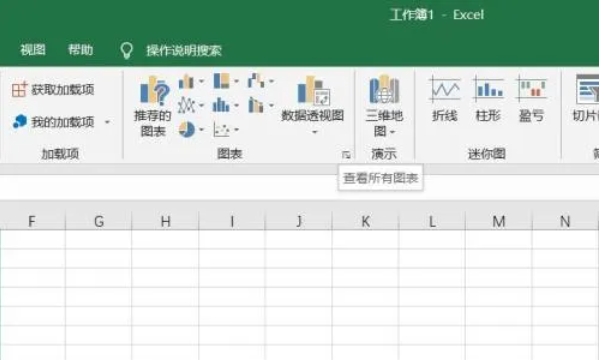
Under the [Insert] tab, click the [More Charts] button.
Step 5
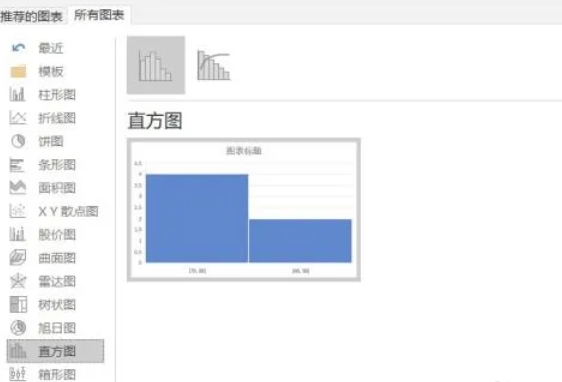
In the pop-up chart selection window, first select the [All Charts] option. Then click [Histogram] in the chart type list.
Step 6
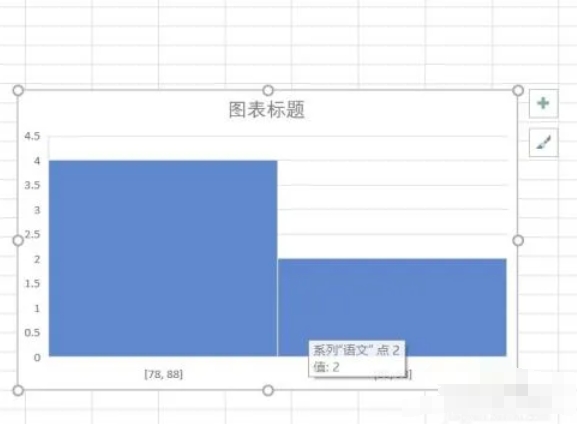
After selecting the appropriate histogram style, click the [OK] button in the window to insert the histogram in the worksheet.
The above is how Huajun editor compiled for you how to insert a histogram in Excel 2016 and how to insert a histogram in Excel 201. I hope it can help you!