How to change the skin of Kingsoft Typing Assistant? -How to change the skin of Kingsoft TypingTong
Time: 2025-07-03Source:Author: Shaobing
Kingsoft Typing Assistant is a typing software that integrates typing practice and testing. So how to change the skin of Kingsoft Typing Assistant? How to change the skin of Kingsoft Typing Assistant? Let the editor give you the answer below!

How to change the skin of Kingsoft Typing Assistant?
1. Open Kingsoft Typing Software and click the “Skin” icon in the upper right corner of the main interface.
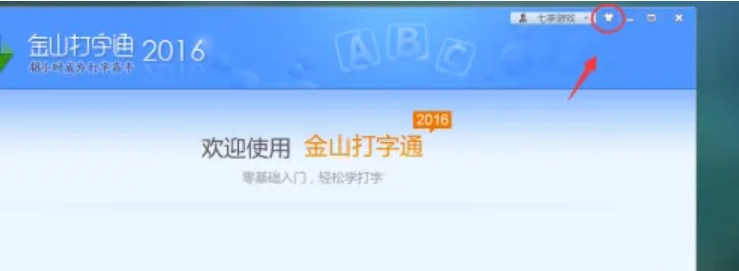
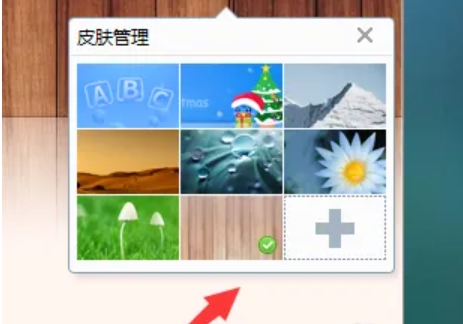
2. Click the icon to pop up the skin selection panel directly, and then click the target skin to switch immediately.
The above is what the editor of Huajun compiled for you. How to change the skin of Kingsoft Typing Assistant? Here’s how to change the skin of Kingsoft Typing, I hope it can help you.
Popular recommendations
-
Kingsoft Typing
Version: 2.2.0.63Size: 20.17 MB
The latest official version of Kingsoft Typing Pass has four functional modules: English typing, Pinyin typing, Wubi typing, and speed test. It allows users to start from scratch. This site provides...
-
Kingsoft Typing
Version: 2.2.0.63Size: 20.17 MB
Practice typing with Shantypingtong, Jinshan Typingtong, similar software to Jinshan Typingtong
Software address
Professional practice tools
...
-
Kingsoft Typing
Version: 2.2.0.63Size: 20.17 MB
It is a typing education software developed by Kingsoft. This software can select different standards according to the user's different levels, allowing users...
-
Jiajia typing practice software
Version: 3.93Size: 12.33MB
Jiajia typing practice software is a training tool focused on improving Chinese and English typing skills. The software takes "simple and efficient" as its core design concept, and uses scientific analysis...
-
Jiajia typing practice
Version: 3.93Size: 12.33 MB
Jiajia typing practice software is a software that focuses on...