How to change the ID name in Warcraft 3 The Frozen Throne? -How to change the ID name in Warcraft 3 The Frozen Throne
Time: 2025-03-08Source:Author: Neal
Warcraft 3 Frozen Throne is a very fun strategy game, so how to change the ID name in Warcraft 3 Frozen Throne? How to change the ID name in Warcraft 3 The Frozen Throne? Let the editor give you the answer below!
How to change the ID name in Warcraft 3 The Frozen Throne?
1. On the main interface of the game, click the "LAN" option to enter LAN mode.
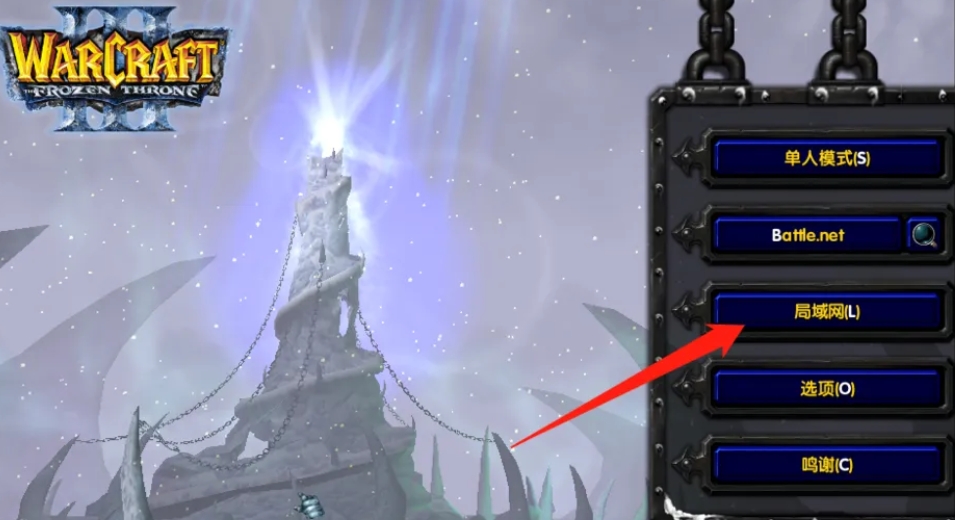
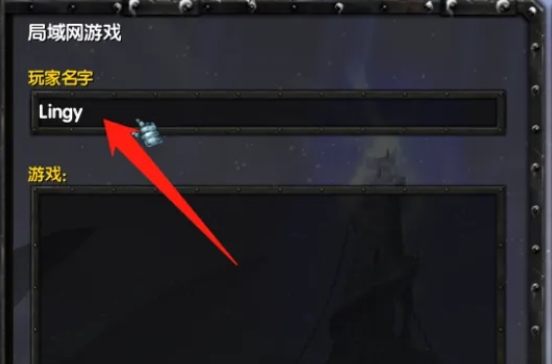
2. In the LAN mode interface, you will see an input box for the player name.
3. In the player name input box, directly enter the new ID name you want to change.
The above is what the editor of Huajun compiled for you. How to change the ID name in Warcraft 3 The Frozen Throne? Here’s how to change the ID name in Warcraft 3 The Frozen Throne, I hope it helps.
Popular recommendations
-
Dancing era
Version: Official versionSize: 118.61MB
Dance Era is a fashionable social music and dance massively multiplayer online game launched by Tencent. The game is based on the classic rhythm button gameplay and integrates a variety of...
-
QQ Dance 2
Version: v7.8.9Size: 750MB
The official version of QQ Dance 2 is a music and dance game distributed by Tencent Games. The latest version of QQ Dance 2 continues the classic gameplay of QQ Dance 2, and at the same time...
-
QQ Dance
Version: v7.8.9Size: 40 GB
It is a music game launched by Tencent in 2008. QQ Dance's dance mode comes with dynamic effects. The graphics in the game are dazzling and colorful, and the characters' costumes...
-
QQ Dance
Version: v7.8.9Size: 26.26 GB
QQ Dance is a music and dance game launched by Tencent in 2008. QQ Dance's dance mode comes with dynamic music effects, and the in-game graphics...
-
27 accelerator
Version: 4.1_1373Size: 3.20 MB
The official version of 27 Accelerator is a game acceleration tool suitable for gamers. The official version of 27 Accelerator can help users improve the network environment, so that...