Chrome browser is a browser that supports a large number of extensions and themes. Users can customize the browser according to their own needs and preferences, such as adding ad blockers, password managers, bookmark synchronization and other extensions, as well as changing browser skins, backgrounds, etc. Next, let the editor of Huajun explain to you how to add an address to Google Chrome and how to add an address to Google Chrome!
first step
Make sure you have the latest version of Google Chrome, then double-click the icon to open it.
Step 2
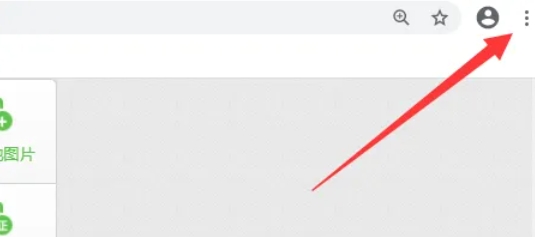
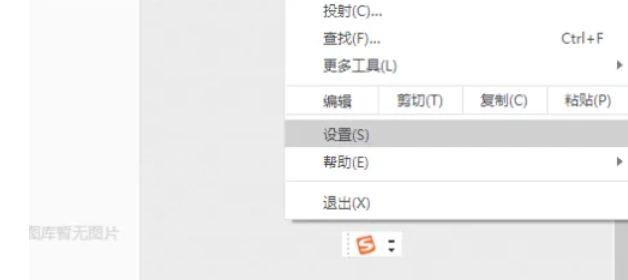
In the upper right corner of the browser window, find and click the three vertical dots icon, which is Google Chrome's "More Options" or "Customize & Control" button. In the pop-up menu, find and click the "Settings" option. This will open the Google Chrome settings page.
Step 3
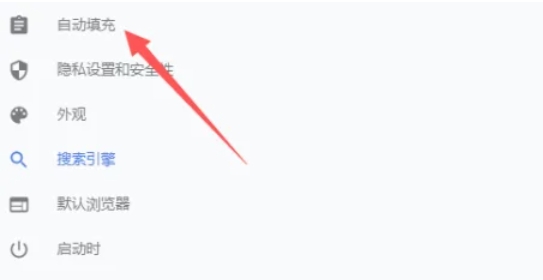
In the left menu of the settings page, scroll and find the "Autofill" option. Click it to expand the relevant settings. In the Autofill page, you'll see multiple options such as "Name & Email," "Password," "Address & Other Information," and more. Click "Addresses and other information" to manage your addresses.
Step 4
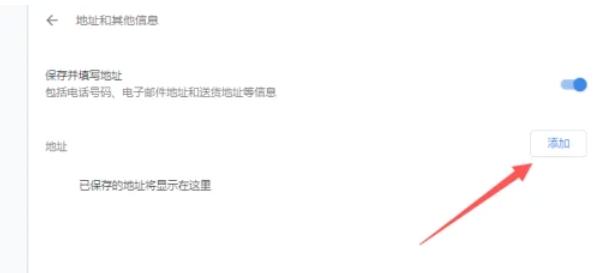
On the "Addresses and other information" page, you'll see a list of your currently saved addresses (if any). At the bottom right of the page, you'll see an "Add" button. Click on it to add a new address.
Step 5
In the pop-up window, you need to fill in the details of your new address such as name, address line, city, state/province, postal code, and country/region. Make sure the information you fill in is accurate.

Step 6
After filling in the address information, click the "Save" button at the bottom of the page. In this way, the new address is added to the address list of Google Chrome.
The above is how to add an address to Google Chrome and how to add an address to Google Chrome compiled by Huajun editor for you. I hope it can help you!