How to set Chinese in Call of Duty? -Chinese method of setting up Call of Duty
Time: 2025-02-21Source:Author:
"Call of Duty Mobile" is a massively multiplayer online first-person shooting game jointly launched by Activision and Tencent. Many friends don’t know how to set the Chinese language for Call of Duty, so hurry up and follow the Huajun editor to take a look!
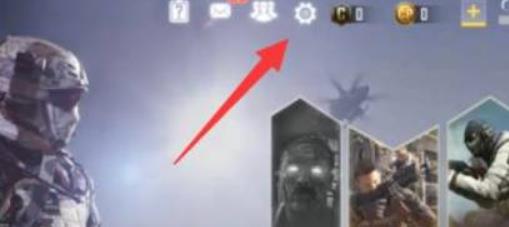
1. After entering the game, click the settings button in the main interface.
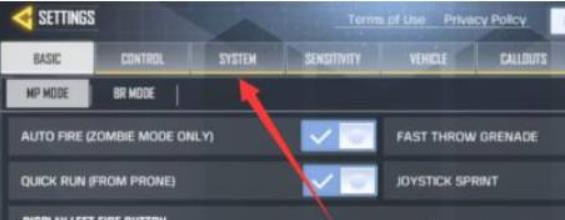
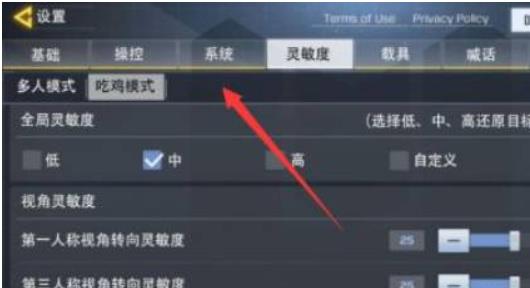
2. After entering the setting interface, click [system] as shown in the picture.
3. Then click [AUDIO].
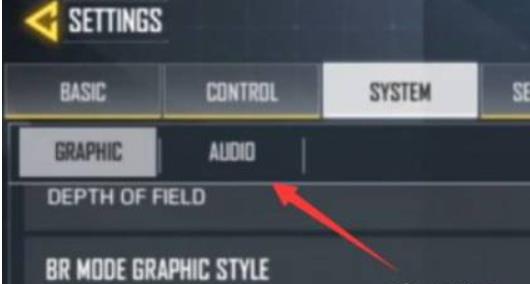
4. Finally, select [chinese] below.
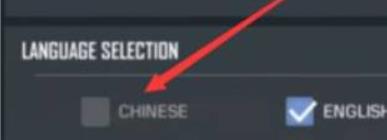
5. Restart the game and you will find that the Chinese modification has been successful.
The above is all about how to set up Chinese in Call of Duty. I hope it can help you!
Popular recommendations
-
Dynasty Warriors Overlord
Version: Official versionSize: 2.7MB
Dynasty Warriors PC version is an authentically authorized role-playing game with the background of the Three Kingdoms. In the official version of the Dynasty Warriors Warriors game, players can...
-
Snake War
Version: 5.28.6Size: 571.7 MB
The official version of Snake Battle is an online casual game that combines Snake and Ball Battle. In the PC version of Snake Battle, players need to eat...
-
Fairy Tail: The Power Awakens
Version: latest versionSize: 886.9MB
Fairy Tail: The Power Awakens PC version is a fun, classic role-playing game, adapted from the original authorized version of the Fairy Tail animation. Fairy Tail: Force...
-
FC emulator
Version: 2.2.1Size: 17.98 MB
The official version of FC Emulator is a classic game platform specially created for nostalgic players. It reshapes the pure fun of the Famicom era with extreme compatibility and user-friendly design...
-
Marvel Showdown
Version: PC versionSize: 3.5MB
Marvel Showdown PC version is a 3D card strategy game officially authorized by Marvel. The official Marvel Showdown game brings together hundreds of famous Marvel heroes...