Smart Primary and Secondary Schools is an App of the National Smart Education Platform for Primary and Secondary Schools. It aims to accelerate the high-quality development of basic education and the modernization of education by deepening the integration and application of information technology and education and teaching. This platform provides professional, high-quality, and systematic resource services to primary and secondary schools, teachers, students, and parents. The platform includes resources in 10 sections: moral education, curriculum teaching, physical education, aesthetic education, labor education, after-school services, teacher training, family education, education reform experience and teaching materials. Some of the teaching material versions of the curriculum teaching resources have been launched online. Next, let the editor of Huajun explain to you how smart primary and secondary schools connect with children and how smart primary and secondary schools connect with children!
first step
First, make sure you have downloaded and installed the Smart Primary and Secondary School APP and logged in successfully.
Step 2
On the homepage or main interface of the APP, find and click the "My" option in the lower right corner to enter the personal information page.

Step 3
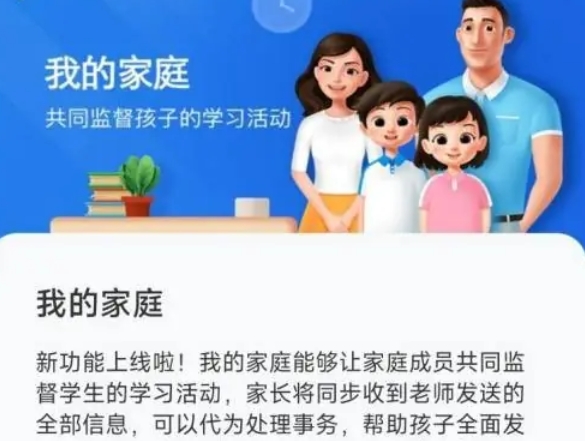
On the "My" page, you will see an option for "Not yet associated with children" (or something similar), click on it.
Step 4
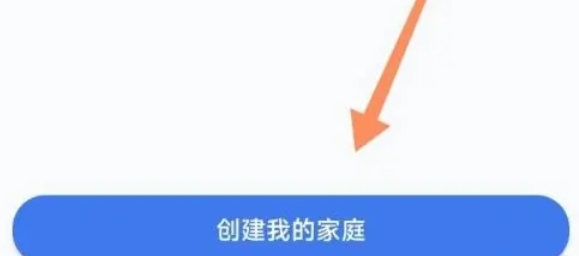
After clicking, the system will pop up a prompt box or introduction page, explaining that you need to create a family to associate children. Here you need to click on the “Create My Family” button.
Step 5
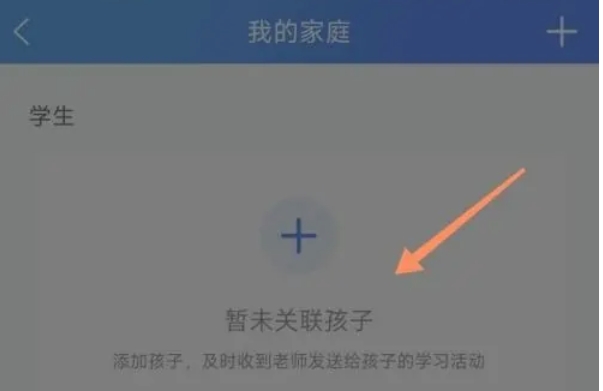
Once you've created your family, you'll see a plus sign (+) or similar add button on the page. Click on it.
Step 6
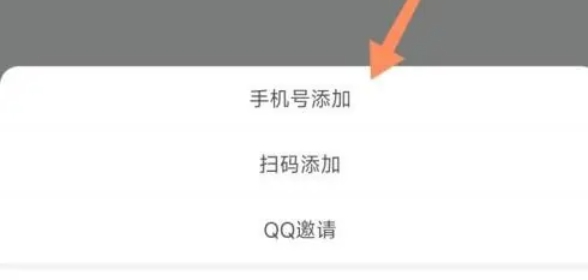
You need to choose how to add children. Usually, you can choose to associate by entering the child's account information (such as student ID, mobile phone number, etc.), or quickly associate by scanning the child's QR code (if the school or teacher has generated a QR code for the child). Enter the corresponding information or scan the QR code to complete the child's association binding.
The above is how the smart primary and secondary schools connect with children and the methods of smart primary and secondary schools to connect with children that the editor of Huajun compiled for you. I hope it can help you!