How to convert MathType independent formula to numbered formula? -Tutorial on converting MathType independent formulas to numbered formulas
Time: 2022-11-21Source: Huajun Software TutorialAuthor: dim sum
Friends, do you know how to convert MathType independent formulas into numbered formulas? Today I will explain the tutorial on converting MathType independent formulas into numbered formulas. If you are interested, come and take a look with me. I hope it can help you.
The operation process of converting MathType independent formulas into numbered formulas

1. Insert number:
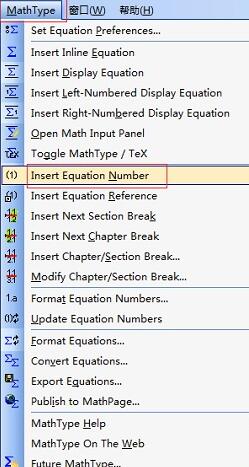
In the line where you want to add the formula number before or after the formula, double-click the mouse, after positioning the cursor, select Mathtype in Word - Insert Equation Numbers and click, you can add new numbers to the independent formulas in the existing order. This method can also add numbers to inline formulas.
2.Switch mode:
1) By pressing Enter, the formula between the lines is placed on a separate line. You can number the formula in the same way and the problem is solved.
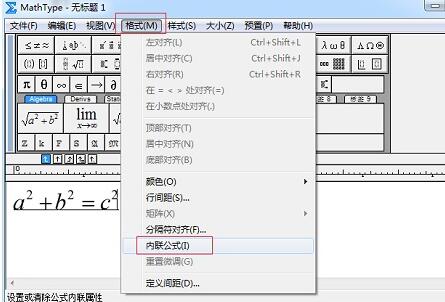
2) Independent formula: Double-click the formula to enter the Mathtype interface - "Format" - "Inline formula" and check the box to switch to inline.
The above is the tutorial brought to you by the editor on converting MathType independent formulas into numbered formulas.All the content, I hope it can help everyone.
Popular recommendations
-
scientific calculator
Version: v1.2.0 official versionSize: 0.29MB
The scientific calculator download version is a powerful scientific calculator software. The scientific calculator software can not only perform ordinary calculations, but also perform coding (information...
-
Windows 7 Calculator
Version: Official versionSize: 732KB
The Windows 7 calculator is really powerful and beautiful, but I was too lazy to download a complete image, so I asked a friend for a file of the calculator and used it to study it. After...
-
WinQSB
Version: 2.0Size: 93MB
This 64-bit WinQSB installation package is designed for Windows 10 and Windows
11 system design, the biggest feature is that it can run directly without a virtual machine. Users can...
-
MathType
Version: 7.8.2Size: 39.13MB
MathType (mathematical formula editor) is developed by Design
A professional mathematical formula editing tool developed by Science Company. MathType function is...
-
MathType
Version: 7.8.2Size: 50MB
MathType is a professional mathematical formula editor that can be used with Office
Compatible with more than 700 programs such as word and Excel, it is convenient for users to edit math test papers,...