Friends, do you know about adding triangle emphasis in MathType? Today I will explain the tutorial of adding triangle emphasis in MathType. If you are interested, come and take a look with me. I hope it can help you.
How to use MathType to add triangle accents to formulas

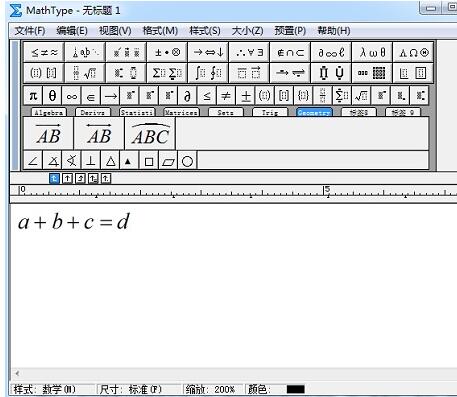
Open the MathType formula editor, enter the formula editing window, and perform regular formula editing.
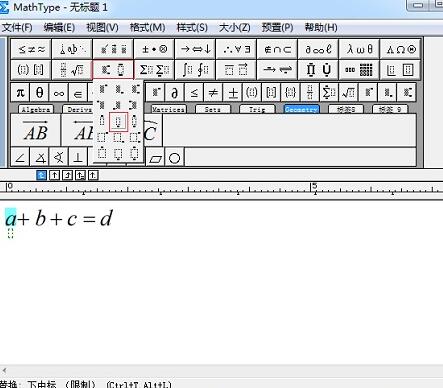
After editing the formula, select the part that needs to be highlighted, and select the "Superscript and Subscript Template" - "Lower Subscript" template in the MathType toolbar template. When selecting a heavy mark, it can be a single letter or a fraction. Do not include arithmetic symbols, otherwise it will look ugly.
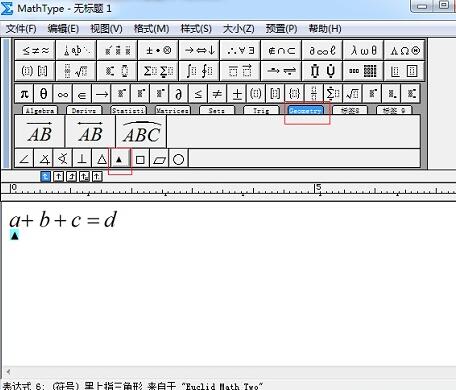
After using the subscript template, be sure to place the cursor in the subscript, otherwise the entered emphasis symbol will replace the letters of the formula. Click the Geometry tab in the MathType tab bar and click the black triangle in it. The other parts are the same, using the middle subscript template and then the black triangle symbol.
Tips: In fact, there are many kinds of emphasis symbols. You can add them according to your own preferences. They can be black triangles, blank triangles, black dots, wavy lines, etc. These are all acceptable.
The above is the MathType tutorial on adding triangles and emphasis brought to you by the editor.All the content, I hope it can help everyone.