How to change the screen tip style in OneNote - How to change the screen tip style in OneNote
Time: 2022-10-25Source: Huajun Software TutorialAuthor: Xiao Hulu
Many people don’t know how to change the screen prompt style in OneNote? The article brought to you today is how to change the screen prompt style in OneNote. If you still don’t know, let’s learn it with the editor.
Step 1: Open OneNote and enter the main interface.
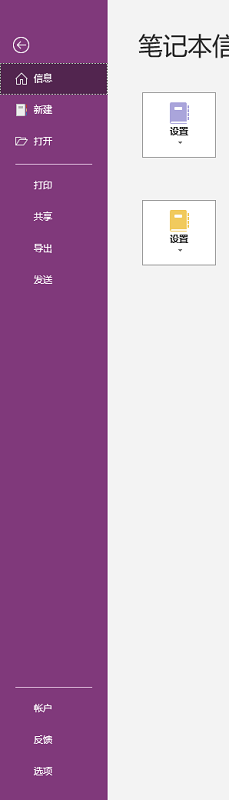
Step 2: After entering OneNote, click File on the menu bar.

Step 3: Enter the file options and select options.
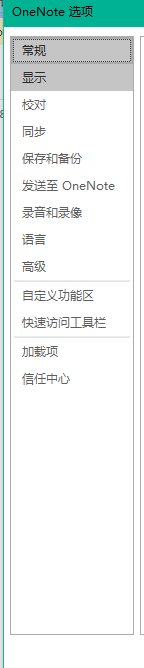
Step 4: Enter the OneNote options and select General.
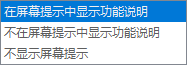
Step 5: Find the user interface option and check the screen prompt style.
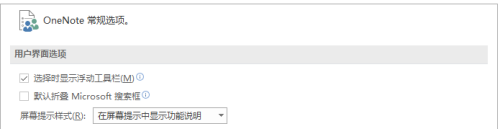
Step 6: Change options.
Step 7: Finally click OK.
The above is the entire content of how to change the screen prompt style of OneNote brought to you by the editor. I hope it can help you.
Popular recommendations
-
OneKeyTools
Version: 10.15.1.0Size: 12.15MB
OneKeyTools (OK plug-in for short) is a free and open source third-party plug-in that focuses on Microsoft Office PowerPoint and WPS presentation...
-
LeBo screen casting
Version: 6.3.50Size: 120 MB
Lebo Screen Mirroring is a multi-screen interactive software that connects mobile devices to large-screen terminals, allowing you to easily share images and sounds to the TV. At the same time, Lebo Screencast also...
-
RayLink remote control software
Version: V8.1.5.8Size: 22.96 MB
True high-definition, ultra-smooth remote control software created by Ruiyun Technology and specially launched for the design industry. It is aimed at game development, architectural design, and media production industries...
-
-
EasyConnect
Version: 7.6.7.0Size: 26.21 MB
The official version of EasyConnect client PC installation package is a remote control software launched by Sangfor. Through the EasyConnect client users can encrypt...