Many people don’t know how to enable system environment repair prompts in Driver Elf? The article brought to you today is how to enable system environment repair prompts in Driver Elf. If you still don’t know, let’s learn it with the editor.
Step 1: First, open the Driver Wizard homepage.

Step 2: Then, click the “Menu” icon.

Step 3: Select the "Settings" button.

Step 4: Click the “Comprehensive Settings” tab again.
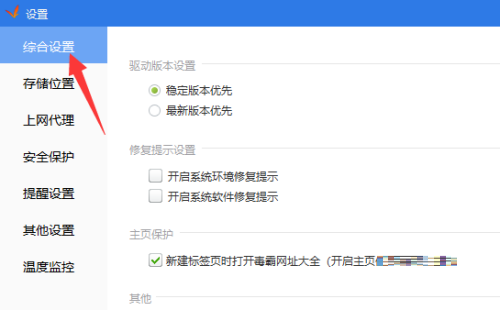
Step 5: Check "Turn on system environment repair prompts".

Step 6: Then, click the "OK" button below.

Step 7: Finally, we click "Close" to complete.

The above is the entire content of the prompts on how to enable system environment repair by the driver wizard brought to you by the editor. I hope it can help you.