How to modify menu hotkeys in Baidu Shangqiao
Time: 2022-03-15Source: InternetAuthor: GiuliaQ
It is estimated that some partners who have just installed Baidu Shangqiao software may not be able to modify the menu hotkeys during use. Today, the editor will share the steps for modifying the menu hotkeys of Baidu Shangqiao. I believe it can help users better use this software.
Open the Baidu Shangqiao software, log in to your Baidu account, and log in.
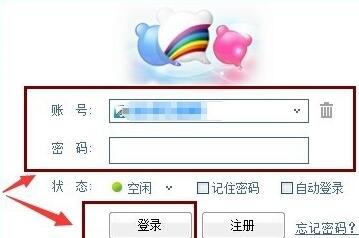
After successfully logging in, click on the upper right corner as shown in the picture. Click on the Basic Settings option.

After opening it, click on the hotkey settings on the left, and you will see some commonly used function hotkeys in the interface. Just modify it as needed.
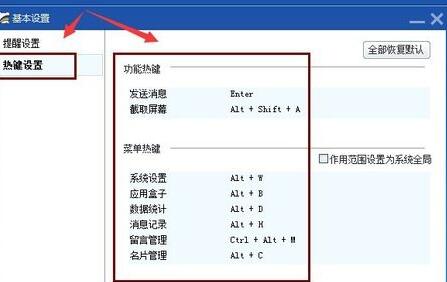
Dear friends, after reading the wonderful content above, you all know the steps to modify the menu hotkeys on Baidu Shangqiao!
Popular recommendations
-
VeryKuai VK accelerator
Version: 2.4.8.2Size: 58.2MB
VeryKuai
VK accelerator has self-built global ring + star nodes, and has an original leading dual protocol + dual channel mode, using both software and hardware to bring users the ultimate game...
-
Tina Toolbox
Version: v3.4.4Size: 6.63MB
TinaToolbox is a simulation and analysis software specially designed for Petri nets (discrete event system modeling tools) and is suitable for Windows systems. It starts with...
-
TINA (TIme petri network analysis tool)
Version: v3.4.4Size: 9.07MB
TINA (TimePetriNetAnalyzer) is an analysis tool specially designed for TimePetri net (time Petri net). Its core function is to use graphics...
-
360wifi sharing wizard
Version: 5.3.0.5020Size: 978.07 KB
The latest version of 360wifi Sharing Wizard is a WiFi connection tool launched by 360. The official version of 360wifi Sharing Wizard can help users share wifi hotspots with one click...
-
Website log analysis tool
Version: 1.3.0Size: 80.58MB
The website log analysis tool is a desktop log analysis tool specially designed for web operation and maintenance personnel, security analysts and website administrators. ...