Network debugging assistant is a very applicable TCP/UDP debugging tool, so how do you send a message to Fei Qiu in the network debugging assistant? Next, the editor will tell you how to send a message to Fei Qiu in the network debugging assistant, hoping to help friends in need.
Open Feiqiu, the interface is as shown below.
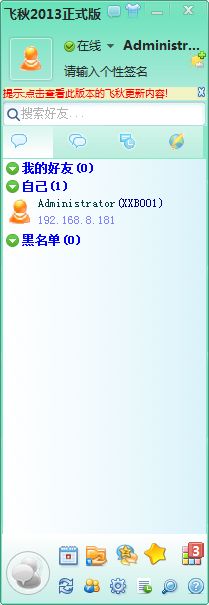
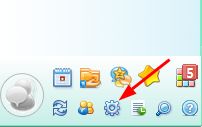
Click the settings icon in the lower right corner to open Feiqiu’s system settings.
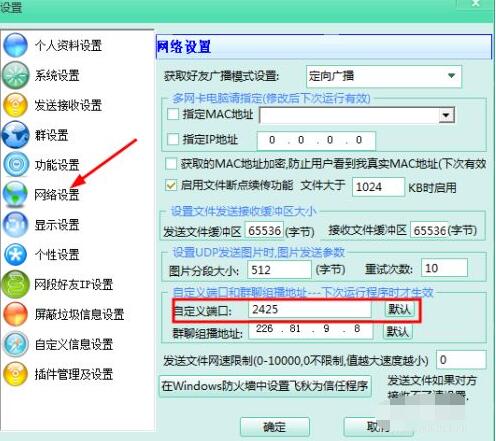
Open the network settings in the system settings and check that the port number used by Fei Qiu is 2425.
Open the network debugging assistant. The interface is as shown in the figure below. You can refer to the following experience for installing network debugging equipment and sending and receiving data.
1How to use the network debugging assistant to test sending and receiving data
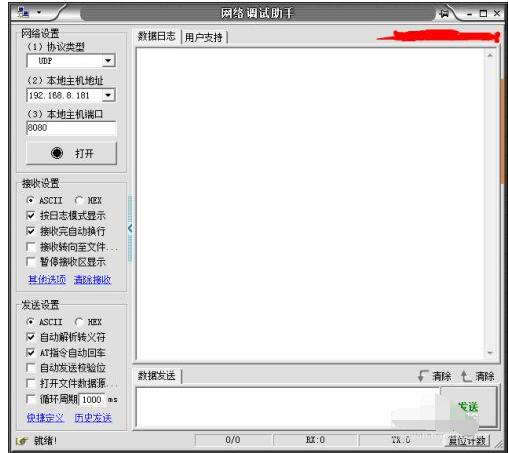
In the network settings, confirm the UDP protocol and click to open it. Although this time the data is sent to Feiqiu and is not the local network debugger, the network debugger must be opened before data can be sent.
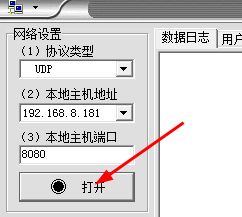
Fill in the local IP and port in the sending address of the network debugging assistant as shown in the figure below.

Fill in the data in the data sending area of the network debugging assistant as follows:
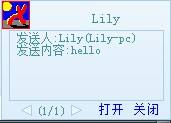
1:1232343454:Lily:Lily-pc:32:hello
The above data format is 1: package number: user name: host name: 32: content to be sent
The package number can be filled in at will.
Click to send

8 Click Feiqiu in the lower right corner to receive the message.
以上这里为各位分享了网络调试助手给飞秋发消息方法。 Friends in need, please come and read this article!