How to hide the buttons in BlueStack Simulator - BlueStack Simulator usage tutorial
Time: 2021-08-30Source: Huajun Software TutorialAuthor: Shaobing
our simulator of the mobile game simulator. The software supports the function of hiding the window, which is what we call the boss key. Through this article, we will share with you how to use the simulator to hide the buttons.
1. Open the BlueStacks simulator and click [Boss Button] in the upper right corner
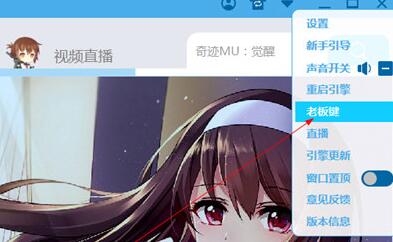
2. Enter the [Boss Key Settings] page and select CTRL+ALT+(any letter).

以上这里为各位分享了蓝叠模拟器隐藏按键的方法。 Friends in need should hurry up and read this article.
Popular recommendations
-
Dynasty Warriors Overlord
Version: Official versionSize: 2.7MB
Dynasty Warriors PC version is an authentically authorized role-playing game with the background of the Three Kingdoms. In the official version of the Dynasty Warriors Warriors game, players can...
-
Snake War
Version: 5.28.6Size: 571.7 MB
The official version of Snake Battle is an online casual game that combines Snake and Ball Battle. In the PC version of Snake Battle, players need to eat...
-
Fairy Tail: The Power Awakens
Version: latest versionSize: 886.9MB
Fairy Tail: The Power Awakens PC version is a fun, classic role-playing game, adapted from the original authorized version of the Fairy Tail animation. Fairy Tail: Force...
-
FC emulator
Version: 2.2.1Size: 17.98 MB
The official version of FC Emulator is a classic game platform specially created for nostalgic players. It reshapes the pure fun of the Famicom era with extreme compatibility and user-friendly design...
-
Marvel Showdown
Version: PC versionSize: 3.5MB
Marvel Showdown PC version is a 3D card strategy game officially authorized by Marvel. The official Marvel Showdown game brings together hundreds of famous Marvel heroes...