How to use Seal Maker Master? Seal Maker Master is a software that can make various seals, including official seals, private seals, public seals, etc. How to use Seal Maker Master? I will share the specific steps with you below.
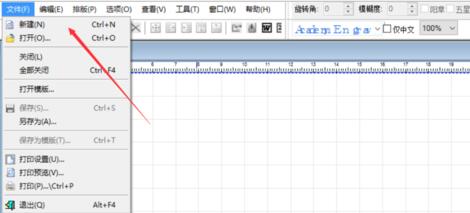
1. After opening Seal Maker, click the "File" option in the menu bar, find the "New" button in the pop-up drop-down, and then you can create a new blank page.
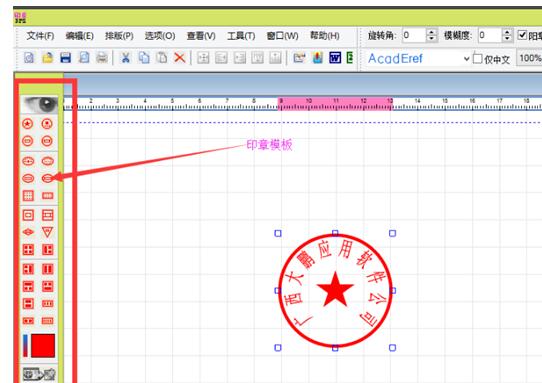
2. First select the seal template on the left side of the page. There are many template styles. Users can choose a template according to their own needs and drag the template to a blank page.
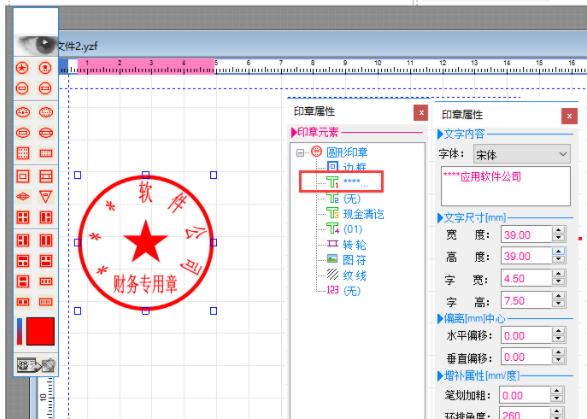
3. You can adjust the text information of the seal in the seal attribute toolbar on the right. Select the seal and click on the text, and a new interface will pop up. In the new interface, you can modify the font style. The size of the text includes width, height, font width and font height, off-center, supplementary attributes and some other attributes. Hollow fonts, italics, ring typesetting, etc. can be adjusted according to needs.
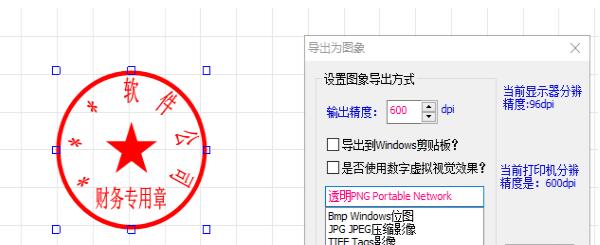
4. After the modification is completed, select the seal, right-click the mouse, find "Export Seal Image" and click. After clicking, you can modify the export method in the pop-up dialog box, whether to export to the Windows clipboard, whether to use digital virtual change effect and the export format. After the modification is completed, click [Export].
以上这里为各位分享了印章制作大师制作公章的方法。 Friends in need, please come and read this article!