How to deactivate Huawei Mobile Assistant? How to deactivate Huawei Mobile Assistant
Time: 2021-08-19Source: InternetAuthor: Neal
Huawei mobile phones have a smart assistant function. Some people like this function. You may not know how to deactivate Huawei mobile assistant. So today I will explain how to deactivate Huawei mobile assistant. I hope it can help you.
1. To use USB to connect a mobile phone, first ensure that the USB cable and USB port are available
2. Next is the operation on the mobile phone. Find and click the [Settings] icon on the mobile phone page.
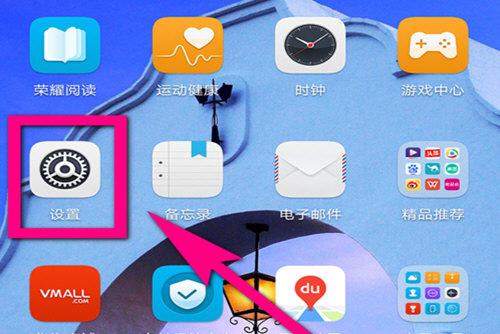
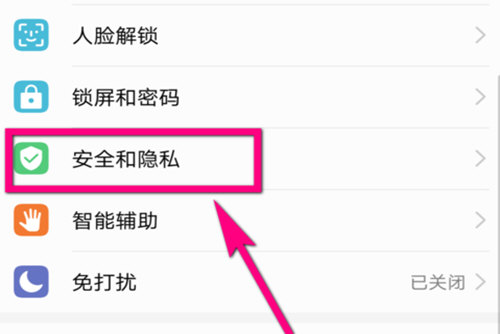
3. Select the security and privacy function in the setting options => More security settings
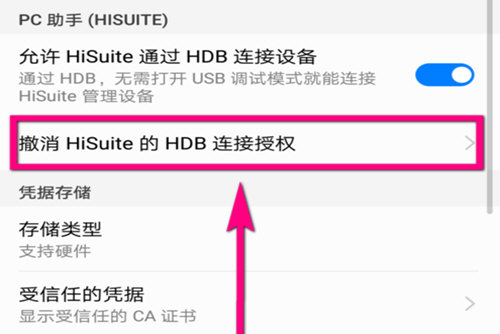
4. Scroll down and click “Revoke HiSuite’s HDB connection authorization”
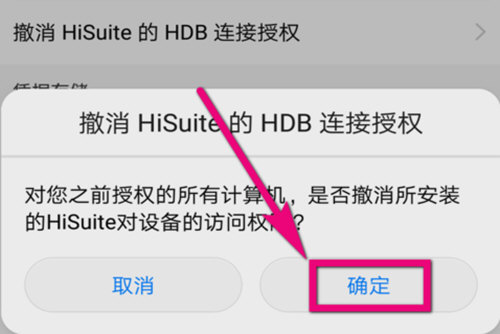
5. Select OK in the pop-up option to cancel the connection authorization.
The above is the method that the editor introduces to you to deactivate Huawei Mobile Assistant. Friends in need, please come and read this article!
Popular recommendations
-
Aisi Assistant
Version: 9.05Size: 242.82 MB
Features of Aisi Assistant
Highlights of Aisi Assistant
Supports three modes: normal mode, DFU mode, and recovery mode to connect to AISI Assistant automatically...
-
Aisi Assistant
Version: 9.05Size: 242.82 MB
Aisi Assistant is a very comprehensive iPhone assistant. Aisi Assistant has extremely convenient one-click functions, including shsh query, shsh backup, and flashing. ...
-
Aisi Assistant
Version: 9.05Size: 242.82 MB
Apple Ace Assistant PC version provides users with a wealth of downloads, including downloading music, ringtones, software and other applications, as well as managing mobile phones. make...
-
chick simulator
Version: 1.1.2Size: 18.72 MB
Chicken Simulator is the most complete simulator game platform on the computer. It is very convenient and practical and has been loved by the majority of users. Chicken Simulator can...
-
Apple mobile assistant
Version: 1.1.2.0 PC versionSize: 13.28MB
The Apple Mobile Assistant PC version is a PC-side auxiliary tool for the IOS system platform. It currently supports mainstream products such as iPhone and iPad. The Apple Mobile Assistant PC version is simple...