How to use PowerISO - How to use PowerISO to create ISO format files
Time: 2020-10-19Source: Huajun Software TutorialAuthor: dim sum
How to use PowerISO to create ISO format files? Some friends may not know how to do it. Below, I will share with you the method of using PowerISO to create ISO format files. Friends in need can come and take a look. I hope it can help you.
1. First, open PowerISO

2. We first prepare the files that need to be made into ISO, as shown in the picture. If I want to make a directory or file on the desktop into an ISO format file, I only need to drag the directory or file to a blank space in the picture.
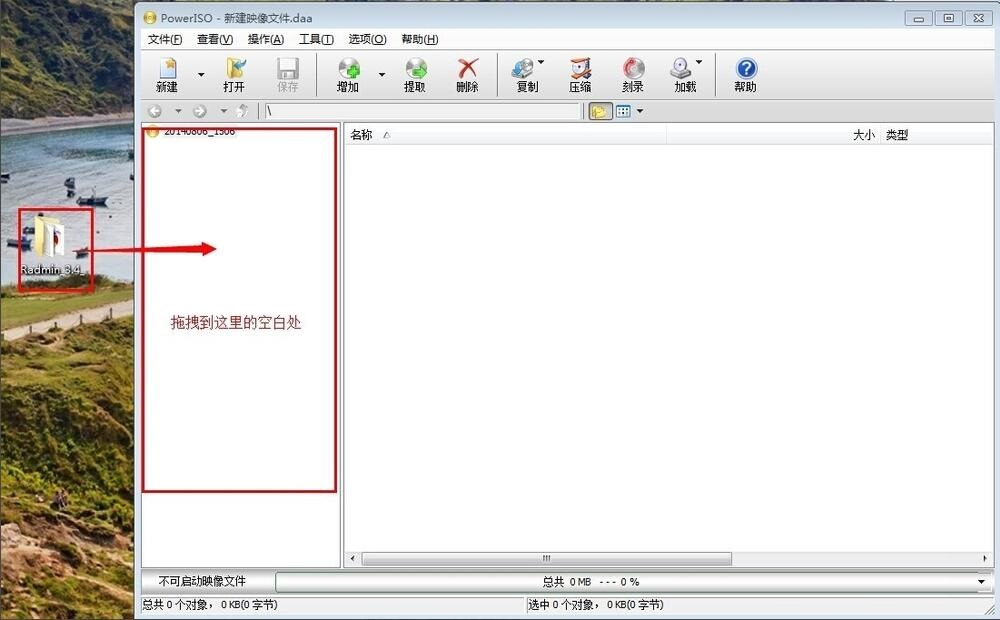
3. After dragging, click "Save". In "Save Type", select "Standard ISO Image File", then enter the file name. For example, our file is called "12345.ISO" and click Save
Such a standard ISO file is created. You can just look at what is generated on the desktop.
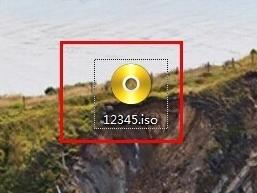
The above is the method shared by the editor to use PowerISO to create ISO format files. Friends who don’t know how to do it quickly come and learn.
Popular recommendations
-
Free virtual optical drive (DAEMON Tools Lite)
Version: 12.3.0.2366Size: 60.94 MB
One of the best virtual tools duo. Small size, powerful function. Supports various operating systems, supports PS discs, and supports simulating almost all disc protection methods...
-
Daemon Tools (elf virtual optical drive)
Version: 12.3.0.2363Size: 47.19MB
DaemonTools (elf virtual optical drive) is a powerful virtual optical drive software with an intuitive and easy-to-use interface, strong compatibility, efficient and stable performance...
-
Daemon Tools (elf virtual optical drive)
Version: 12.3.0.2352Size: 47.19MB
DaemonTools (Genie Virtual Optical Drive) is a powerful virtual optical drive software. The software supports up to 4 virtual optical drives running at the same time and is compatible with CD/DVD/Blu-ray...
-
Daemon Tools (elf virtual optical drive)
Version: 12.3.0.2363Size: 60.95 MB
The latest version of DaemonTools (Elf Virtual CD-ROM Drive) is a professional virtual CD-ROM drive software. Daemon
The official version of Tools can help users convert image files...
-
Free virtual optical drive (DAEMON Tools Lite)
Version: 12.3.0.2352Size: 61.71 MB
One of the best virtual tools duo. Small size, powerful function. Supports various operating systems, supports PS discs, and supports simulating almost all disc protections...