How to use 360u Disk Assistant - Instructions for use of 360u Disk Assistant
Time: 2020-09-24Source: Huajun Software TutorialAuthor: Rocket
Dear novice friends, do you know how to use 360u disk assistant? In the following article, the author will share the usage and operation content of 360 USB Disk Assistant. I hope that through studying this tutorial, it can be helpful to all my friends.
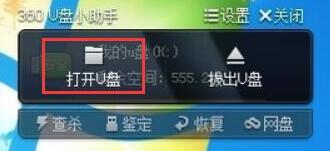
1. When the U disk is inserted into the computer, hover the mouse on the floating window of 360 U Disk Assistant, and two buttons "Open U Disk" and "Pull Out U Disk" will appear. Click "Open U Disk" to directly open the U disk directory and display all files stored in the U disk.
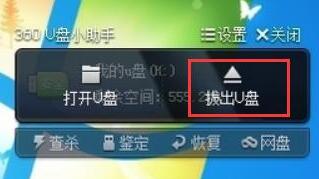
2. Click "Pull out U disk" to quickly pull out the U disk, without having to click multiple times through the toolbar in the lower right corner.
The above is the user guide of 360u disk assistant brought by the editor. Let’s learn it together. I believe it can help some new users.
Popular recommendations
-
Big pie AI voice change
Version: v2.5.6Size: 113 MB
Dabi AI voice changing software is a powerful, easy-to-use, efficient and stable real-time voice changing software. It can satisfy users' various audio processing needs...
-
-
Baidu Mind Map Client Offline Version
Version: v3.2.2Size: 18.16MB
The official version of Baidu Mind Map Client is an excellent web application for making brain maps and mind maps. The official version of Baidu Mind Map Client has a beautiful interface and functional...
-
Multiplayer keyboard connecter
Version: 1.0.0.2Size: 184.00 KB
We can free our hands and let the computer help us complete the game operations, which will bring you a different experience. Multiplayer dot connecter is not only used for games, but also for frequent dots...
-
Multiplayer keyboard connecter
Version: 1.0.0.2Size: 184.00 KB
We can free our hands and let the computer help us complete the game operations, which will bring you a different experience. Multiplayer dot connecter is not only used for games, but also for frequent dots...