Recently, some BarTender users have reported that they encountered error message 3702 during their operations, and they were very distressed by this. For this reason, today I will explain how to handle error message 3702 in BarTender. I believe it will definitely help you.
The error message box is shown in the figure:
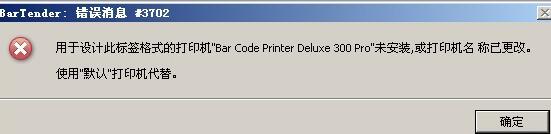
BarTender error message 3702 specific description
The printer "Bar Code Printer Deluxe 300 Pro" used to format this label is not installed, or the printer name has been changed. Use the "default" printer instead.
Reason analysis:
Since the software saves the settings to Format/Template and stores the template together in Format/Template, BarTender error message 3702 will pop up when the template is opened again. From the message warning box in the picture above, it can be determined that the printer model stored in the format/template is: "Bar Code Printer Deluxe 300 Pro". Because there is no driver named "Bar Code Printer Deluxe 300 Pro", the computer will automatically select the default printer.
The processing operations are as follows:
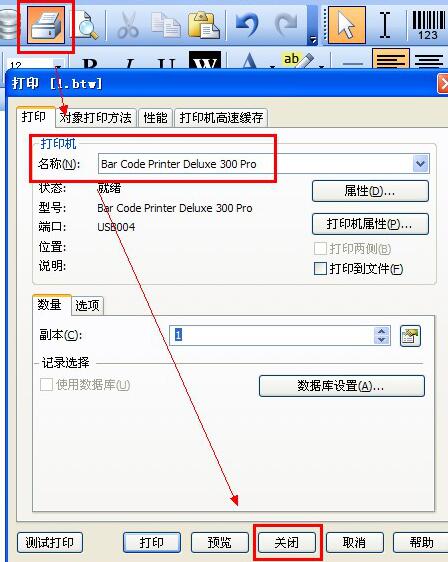
After the BarTender error message 3702 appears, press OK and the computer will automatically select the default printer for you. If it is the printer you need, you will be fine. If the default printer is not a label printer/barcode printer, you need to manually specify it: click the "Print" button in the BarTender toolbar, select the "Printer Name" in the pop-up "Print" dialog box, and after modification, click "Close".
Above, I have shared with you the tutorial on how to deal with error message 3702 in BarTender. Friends in need should hurry up and read this article.