Cheetah Free Wifi is a software that can convert computer network signals into WIFI signals. Many computer users have installed it. However, after some netizens downloaded the Cheetah Free Wifi software and followed the prompts to open the Cheetah Free Wifi software, they were prompted that Cheetah Free Wifi could not be opened, or Cheetah Free Wifi failed to open. So why can’t Cheetah Free Wifi be turned on? What should I do?

Solution to Cheetah Free Wifi Failure to Turn On
Reasons why Leopard Free Wifi failed to turn on:
In fact, Cheetah Free Wifi is just a simple tool for sharing computer network into Wifi wireless network. In fact, it has the same function as Wifi Sharing Wizard and other software. However, there is a premise that your computer must have a wireless network card and turn on the wireless network card to convert the computer network that can access the Internet into a Wifi wireless network. Usually only notebooks support it, and desktop computers do not have wireless network cards, so the activation will definitely fail.
How to check if your computer has a wireless network card:
The biggest highlight of Cheetah Free Wifi is that it can be turned on with one click, without the user having to set up the computer cumbersomely, but the premise is that the computer needs wireless network card support. To check whether their computer has a wireless network card, users can enter the device manager to check whether there is a wireless network card device, as shown in the figure below:
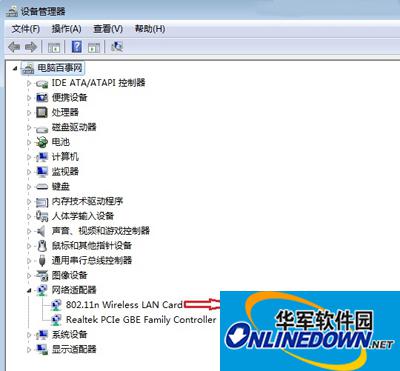
Check if the computer has a wireless network card
You can check whether your computer has a wireless network card in Device Manager.
Solution to Cheetah free Wifi failure:
Desktop computer users can purchase a USB wireless network card to achieve this. However, USB network cards generally cost tens of yuan and are not very convenient. The best option is that users only need to spend less than 20 yuan to purchase Xiaodu Wifi or 360 Wifi to easily transform the computer network into a Wifi network. There is no need to use Cheetah Free Wifi.
For notebook users, if the notebook has a wireless network card and after turning it on, Cheetah Free Wifi still fails to open, you may wish to use the Wifi Sharing Wizard or set up the computer to achieve it.