Mobile Taobao: Extended delivery settings
Time: 2017-03-10Source: Huajun InformationAuthor: Hard work haha
Friends who shop on Taobao know that when we receive the goods, we need to confirm receipt and then pay with Alipay. If the product is not satisfactory and the delivery time is too slow and exceeds the confirmation time of receipt, then we will extend the delivery time, which can also be done on the mobile Taobao client.
1) Open Taobao on mobile phone, select the [My Taobao] bar in the lower right corner, and click [Waiting for receipt].

Awaiting receipt
2) Find the items that need to be delayed, click [Extend Receipt], and select [OK] to extend the receipt time.
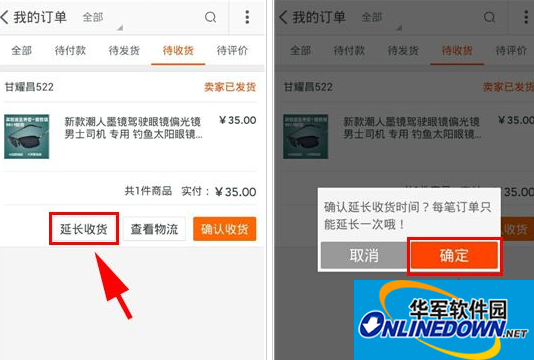
Extend delivery
Okay, the above is all the content brought to you by the editor. Isn’t it very simple? Have you learned it? If you want to know more about Taobao, please pay attention to Huajun information updates at any time. More shopping tools are available in Huajun Software Park. Welcome to download from this site.
Popular recommendations
-
Huaxia Collection Network
Version: 7.20.6Size: 57.58 MB
Huaxia Collection Network is a professional exchange platform and trading community for antique and art collections in China. Its software provides a full range of mobile services for collectors, with the core...
-
China Resources
Version: 5.5.7Size: 39.33 MB
China Resources Communication is a smart life service platform that integrates the consumption scenarios and membership services of various industrial sectors under China Resources. Through a unified membership points system, the platform provides...
-
Shared supply
Version: 3.2.4Size: 55.5 MB
The shared supply Android version is a product-finding software that brings together first-hand wholesale markets. The shared supply app selects wholesale markets across the country, with a large supply of goods, and users are sharing the supply a...
-
Zheng Caiyun
Version: 4.66.0Size: 64.33 MB
Zhengcai Cloud Android version is a professional government online procurement platform. The official version of Zhengcai Cloud app supports the entire procurement process, various fields, multiple users and other functions, integrating...
-
Zhengcai Cloud Business Edition
Version: 2.31.0Size: 57.71 MB
The Caiyun platform merchant version mobile APP can facilitate you to quickly restore the information content sent by the purchaser. It has a built-in order query function, which can be processed with one click...