Below, the editor will share with you how to use WinRAR's volume compression function to easily bypass the forum attachment size limit. Let’s take a look at the specific WinRAR graphic tutorial!
How to use WinRAR volume compression function:
In general forums, the limit on the size of uploaded attachments is: "less than 2048 kb", as shown below.

Forum
The RAR compressed package we need to upload obviously exceeds this limit. Let's use WinRAR to split it. Double-click the required RAR file and open it with WinRAR. After entering WinRAR, click the menu "Tools" → "Convert Compressed File Format", as shown below.
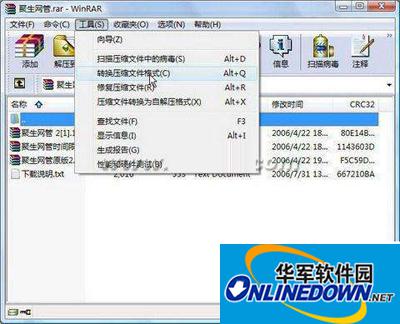
WinRAR
Enter the "Convert Compressed File" dialog box. The default compressed file type is: "rar (1)". In this example, we will use "Volume Compression", so keep the RAR format options unchanged. Click the "Compress" button to enter the settings, as shown below.

WinRAR
Enter the "Set Default Compression Options" dialog box, find the "Compression volume size, bytes" option, select "3.5": 1457664" in the drop-down list (the file size after volume can meet the needs of loading into a 3.5-inch floppy disk), click the "OK" button to complete, as shown below.
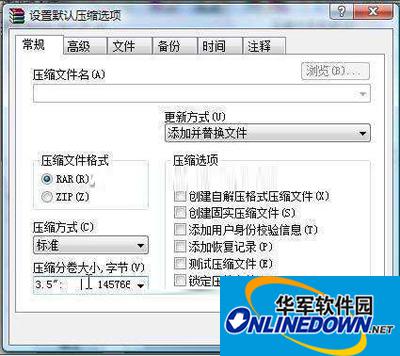
WinRAR
Next, WinRAR will return to the dialog box shown in Figure 3. Click the "OK" button to officially start file conversion. After the file conversion is completed, return to the main window of the software and you can see that the original RAR file has been automatically split into three RAR files, as shown in Figure 5.
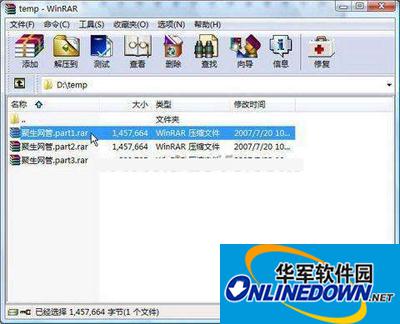
WinRAR
Now the original file has been cut into three files, and the size of each file is within the limit of uploading attachments to the forum. In this way, we will naturally upload them without any problems.