
Hot search terms: 360 Security Guard Office365 360 browser WPS Office iQiyi Huawei Cloud Market Tencent Cloud Store
Hot search terms: 360 Security Guard Office365 360 browser WPS Office iQiyi Huawei Cloud Market Tencent Cloud Store

Antivirus software Storage size: 45.60 MB Time: 2022-12-27
Software introduction: Soft is a lightweight, efficient and free computer and anti-virus security software. The computer version of Tinder Security Software is powerful and can fully protect our...
Tinder Security Software is a domestic security protection software known for its "professional, lightweight and pure" nature. It uses a self-developed intelligent anti-virus engine and integrates advanced technologies such as behavioral sandbox analysis and machine learning to build a three-dimensional defense system including virus killing, real-time protection, network firewalls, and malicious behavior interception. With an ultra-small memory footprint of less than 30MB and a simple and ad-free interface design, the software provides users with a quiet and non-intrusive security protection experience. Its unique "pop-up blocking" and "startup item management" and other practical tools, as well as professional functions that support custom protection rules, not only meet the security needs of ordinary users, but also provide professionals with the possibility of in-depth customization. It is an ideal choice for users who pursue efficient and pure protection. Next, let the editor of Huajun explain to you how to change the number of days the log is saved by Tinder Security Software and how to change the number of days the log is saved by Tinder Security Software!
first step
Double-click the [Tinder Security] icon on the desktop to start the program.

Step 2
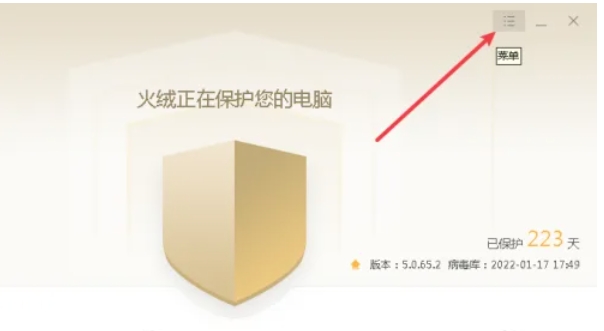
In the upper right corner of the main interface of the software, click the [three horizontal lines ≡] icon

Step 3
In the drop-down menu, select [Security Settings] and enter [Security Settings]
Step 4
In [General Settings] → [Basic Settings], find [Number of Days to Save Logs]

Step 5
The default is usually 30 days, which can be modified to 7 days, 60 days, 90 days or a custom value.

Step 6
Modifications will automatically take effect without manual saving.

The above is how the editor of Huajun organizes for you how to change the number of days the logs are saved in the Tinder Security software and how to change the number of days the logs are saved in the Tinder Security software. I hope it can help you!

 How to draw a lottery in 360 Software Butler - How to draw a lottery in 360 Software Butler
 How to collect software in 360 Software Manager - How to collect software in 360 Software Manager
 Microsoft Edge browser
 Steam
Steam
 Tencent Video
 WPS Office
 iQiyi
iQiyi
 Sohu video player
 Lightning simulator
 MuMu emulator
 Eggman Party
 What to do if there is no sound after reinstalling the computer system - Driver Wizard Tutorial
 How to switch accounts in WPS Office 2019-How to switch accounts in WPS Office 2019
 How to clear the cache of Google Chrome - How to clear the cache of Google Chrome
 How to fire bullets in scratch-How to fire bullets in scratch


