
Hot search terms: 360 Security Guard Office365 360 browser WPS Office iQiyi Huawei Cloud Market Tencent Cloud Store
Hot search terms: 360 Security Guard Office365 360 browser WPS Office iQiyi Huawei Cloud Market Tencent Cloud Store

web browsing Storage size: 10.29MB Time: 2022-12-29
Software introduction: The latest version of Google Chrome (64-bit) is a web browser officially created by Google for users. Google Chrome Google...
Google Chrome is a web browsing tool officially presented to users by Google. It allows you to use the Internet faster, easier and more securely. It has a super simple design and is more convenient to use. So how to speed up Google Chrome downloads? How to speed up Google Chrome downloads? Let the editor give you the answer below!

How to speed up Google Chrome downloads?
1. Check and optimize network connection
Make sure your network connection is stable:
Restart the router: A router that has been running for a long time may cause network instability. Restarting can refresh the network connection.
Use a wired connection: Compared to Wi-Fi, wired connections are generally more stable and can provide faster download speeds.
Use speed measurement tools such as Speedtest to check the current network speed and ensure that the network bandwidth is sufficient to support high-speed downloads.
Optimize the network environment:
Try downloading in different network environments to see if there is an improvement.
If possible, try upgrading to a higher-speed internet plan.
2. Clear browser cache and disable unnecessary extensions
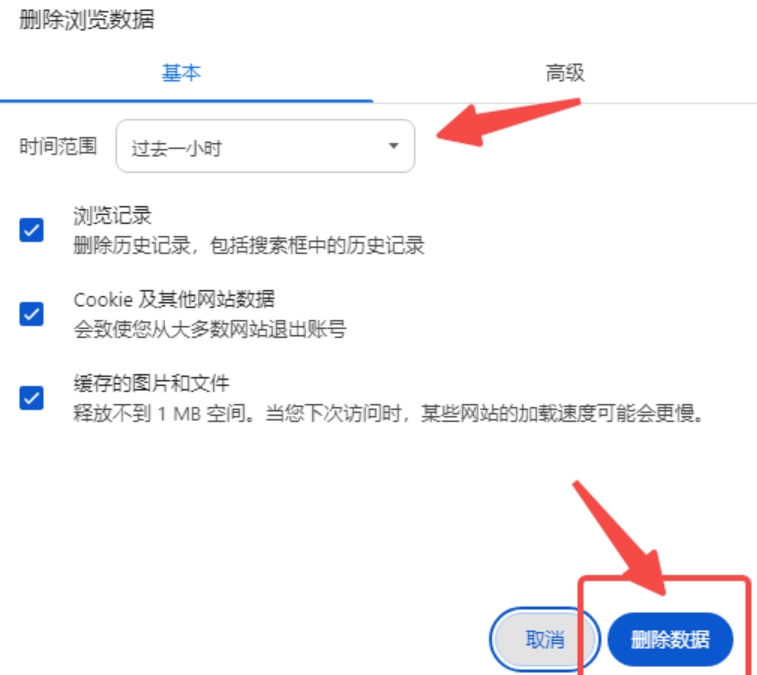
Clear browser cache:
Excessive browser cache may affect download speeds.
In Google Chrome, you can go to Settings via the three dots icon in the upper right corner, then clear browsing data in the "Privacy & Security" option, select "All time" and check "Cached images and files".
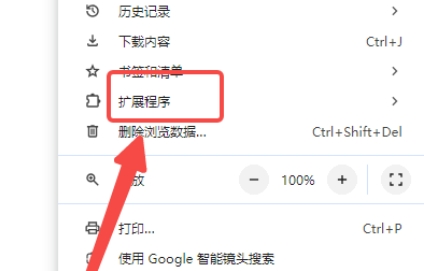
Disable unnecessary extensions:
Too many extensions will occupy system resources and affect browser performance.
Find "Extensions" in Google Chrome's "More Tools" and disable or remove extensions you don't use often.
3. Adjust browser settings
Close background applications:
In the "Advanced" options of Google Chrome, find the "System" section and turn off the "Continue running background apps" option.
Turn off preloading pages:
In the "Privacy & Security" options, turn off the "Preload pages for faster browsing and searching" option to reduce unnecessary resource usage.
The above is how the editor of Huajun compiled for you how to speed up the downloading of Google Chrome? Here’s how to speed up Google Chrome downloads, I hope it can help you.

 How to add background music in python-How to add background music in python
 How to configure environment variables in python - How to configure environment variables in python
 How to run python - How to run python
 How to create a project in python - How to create a project in python
 How to make a blue sky background with scratch-How to make a blue sky background with scratch
 Microsoft Edge browser
 Steam
Steam
 Tencent Video
 WPS Office
 iQiyi
iQiyi
 Sohu video player
 Lightning simulator
 MuMu emulator
 Eggman Party
 What to do if there is no sound after reinstalling the computer system - Driver Wizard Tutorial
 How to switch accounts in WPS Office 2019-How to switch accounts in WPS Office 2019
 How to clear the cache of Google Chrome - How to clear the cache of Google Chrome
 How to fire bullets in scratch-How to fire bullets in scratch
