
Hot search terms: 360 Security Guard Office365 360 browser WPS Office iQiyi Huawei Cloud Market Tencent Cloud Store
Hot search terms: 360 Security Guard Office365 360 browser WPS Office iQiyi Huawei Cloud Market Tencent Cloud Store

Game assistance Storage size: 67.60 MB Time: 2022-12-08
Software introduction: NetEase Cloud Game Android version is a game platform officially created by NetEase. The official version of NetEase Cloud Game App covers the latest and most comprehensive popular games...
How to set the account password for NetEase Cloud Games?
1. First enter the free website of NetEase Cloud Games, and then click "Login" in the upper right corner.

2. Then find the game you want to play below, such as Guangyu, and click "Play in seconds".

3. Then Cloud Games will test the running environment of the game.
4. A new interface will then open, where users can see the prompt "Log in using account and password"
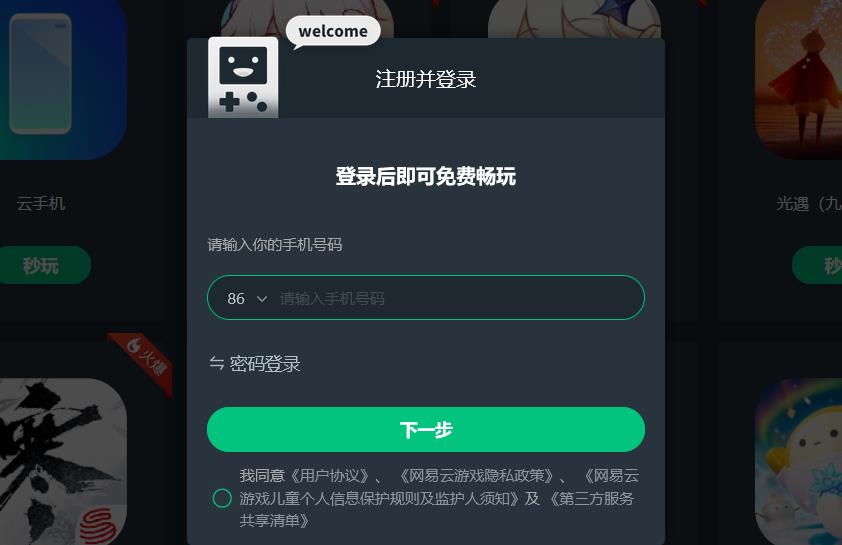
5. Users can log in to their NetEase account here to play.
How to log out of NetEase Cloud Games?
Open the "NetEase Cloud Game" software, click "My" and select the "Settings" option
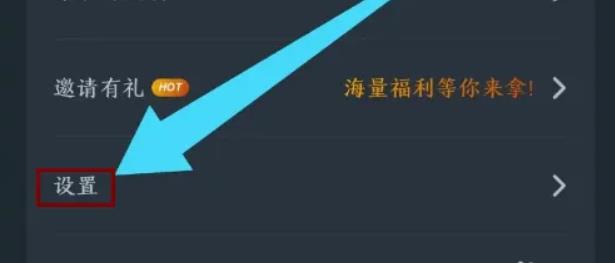
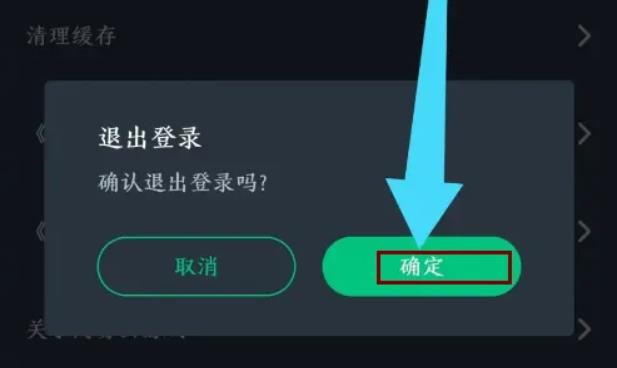
Continue to click on the "Log out" option

Finally click the "OK" option to complete the operation
The above is the relevant content about NetEase Cloud Games. I hope it will be helpful to you!

 How to draw a lottery in 360 Software Butler - How to draw a lottery in 360 Software Butler
 How to collect software in 360 Software Manager - How to collect software in 360 Software Manager
 Microsoft Edge browser
 Steam
Steam
 Tencent Video
 WPS Office
 iQiyi
iQiyi
 Sohu video player
 Lightning simulator
 MuMu emulator
 Eggman Party
 What to do if there is no sound after reinstalling the computer system - Driver Wizard Tutorial
 How to switch accounts in WPS Office 2019-How to switch accounts in WPS Office 2019
 How to clear the cache of Google Chrome - How to clear the cache of Google Chrome
 How to fire bullets in scratch-How to fire bullets in scratch


