Hot search terms: 360 Security Guard Office365 360 browser WPS Office iQiyi Huawei Cloud Market Tencent Cloud Store
Hot search terms: 360 Security Guard Office365 360 browser WPS Office iQiyi Huawei Cloud Market Tencent Cloud Store

audio editing Storage size: 12.5 MB Time: 2021-09-18
Software introduction: Goldwave is a powerful and excellent audio editing tool. Goldwave is small in size and powerful in editing sounds...
Some of you have just started using GoldWave software, and you may not know how to set up the audio reverberation effect. Today I will explain the simple operation method of setting up the audio reverberation effect in GoldWave. I hope it can help you.
First, drag the audio file into the software. You can also click [File] – [Open] in the menu bar above to add the audio file that needs to be edited.
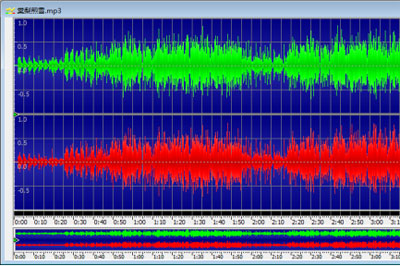
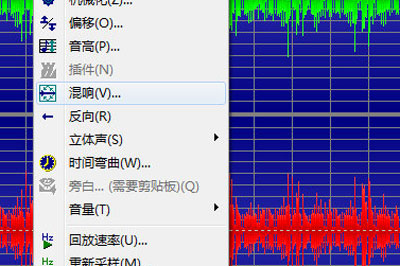
Reverb adds sound and richness to sounds by simulating acoustic reverberation and echo in a room or room. The reverberation time is used to set the size of the reverberation. The longer the time, the larger the room. Set the reverb effect by clicking [Effect] - [Reverb] in the upper menu bar.
Volume allows the lower the volume, the quieter the reverb will be. Values less than -18dB give good results. Delay Depth changes the reverb’s delay for fine-tuning, using 1.0 as the standard reverb.
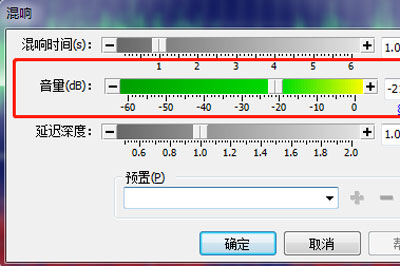
After adjustment, you can click the green arrow to hear the effect of the adjustment. If you are not satisfied, you can click Cancel and readjust. If you are satisfied, click OK and the software will automatically process it. Finally, save the adjusted audio by saving it as.
Dear friends, after reading the above exciting content, you all know the simple operation process of setting audio reverberation effect with GoldWave!

 How to download, install and register the EA platform (Rotten Orange), one article will teach you
 How to register for Google Mail - understand it all in one article - Huajun Software Park
 How to connect HP wireless printer to WiFi, one article will teach you
 Microsoft Edge browser
 Steam
Steam
 Tencent Video
 WPS Office
 iQiyi
iQiyi
 Sohu video player
 Lightning simulator
 MuMu emulator
 Eggman Party
 Detailed steps for renaming shape layers in Image Factory
 How to exit safe mode on Xiaomi? -How to exit safe mode in Xiaomi
 How to use Xiaomi Mobile Assistant? -Xiaomi Mobile Assistant usage tutorial
 How to force restart Xiaomi phone? -How to force restart your phone in Xiaomi
 How to set the computer shutdown timer? -Tutorial on setting up computer shutdown schedule