
Hot search terms: 360 Security Guard Office365 360 browser WPS Office iQiyi Huawei Cloud Market Tencent Cloud Store
Hot search terms: 360 Security Guard Office365 360 browser WPS Office iQiyi Huawei Cloud Market Tencent Cloud Store

Network tools Storage size: 20.7MB Time: 2022-08-03
Software introduction: The official version is a Mac computer-based enterprise. The latest version of EasyConnect for Mac can help users use the company outside the office...
Recently, some friends have asked the editor what to do if EasyConnect for Mac cannot connect? Here is the EasyConnect for Mac Friends who need help can find out how to solve the problem of Mac not being able to connect.
1. Check that csrutil status is disabled
Enter the command csrutil status in the terminal to check whether the status is disabled, as shown in the following figure:
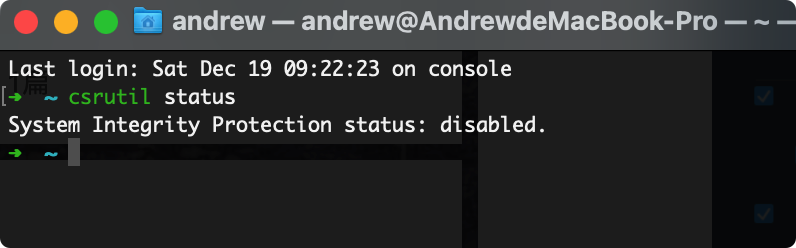
If it is not disabled, you need to perform the following operations to solve the problem:
You can change the SIP opening status by entering recovery mode. You need to restart the system in recovery mode. When you see the Apple Logo after restarting, press "Command + R" to enter recovery mode.
After entering, open "Utilities"-"Terminal".

Then enter the following command to turn off "System Integrity Protection (SIP)". If the command is entered correctly, a successful prompt will be returned after running the command.
csrutil disable
Then restart the system. After restarting, you can also enter the following command again to confirm whether SIP is turned off.
csrutil status
After restarting the computer, open "Security and Privacy" and find that after clicking "Allow" in the list below, there is additional information about EasyConnect

Just run the program containing the keyword "sangfor". If you don't have the above options, don't worry and jump directly to the second solution in this article.
2. Check the EasyConnect startup items
You can use uninstall tools (such as Tencent Lemon Cleaner, App Cleaner & Uninstaller, etc.). This article uses App Cleaner & Uninstaller for example:
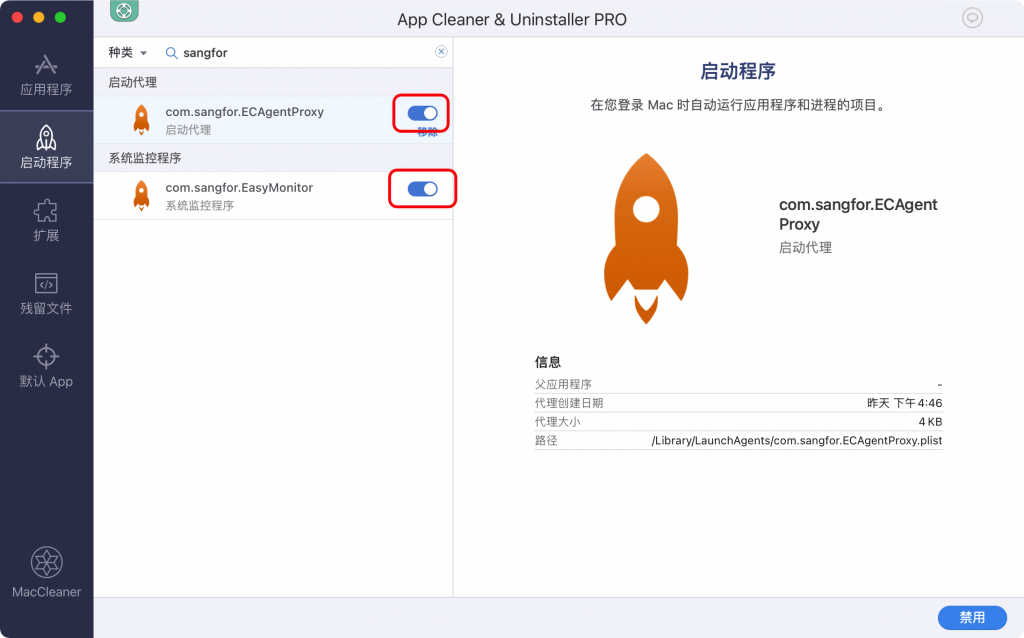
Search for sangfor in the startup program to find the EasyConnect daemon, hook it up, and then restart the computer.
The above is all the content that the editor has brought to you on what to do if EasyConnect for Mac cannot connect. I hope it can help you.

 How to add background music in python-How to add background music in python
 How to configure environment variables in python - How to configure environment variables in python
 How to run python - How to run python
 How to create a project in python - How to create a project in python
 How to make a blue sky background with scratch-How to make a blue sky background with scratch
 Steam
Steam
 Tencent Video
 WPS Office
 iQiyi
iQiyi
 Sohu video player
 Lightning simulator
 MuMu emulator
 Eggman Party
 WPS Office 2023
 What to do if there is no sound after reinstalling the computer system - Driver Wizard Tutorial
 How to switch accounts in WPS Office 2019-How to switch accounts in WPS Office 2019
 How to clear the cache of Google Chrome - How to clear the cache of Google Chrome
 How to fire bullets in scratch-How to fire bullets in scratch
