
Hot search terms: 360 Security Guard Office365 360 browser WPS Office iQiyi Huawei Cloud Market Tencent Cloud Store
Hot search terms: 360 Security Guard Office365 360 browser WPS Office iQiyi Huawei Cloud Market Tencent Cloud Store

Database class Storage size: 850 MB Time: 2022-08-05
Software introduction: SPSS, the full name of Statistical Product and Service Solutions, is an excellent data analysis software designed to provide users with...
How to group data in SPSS? Many users are asking this question? Let's come to the editor to take a look at the operation tutorial of data grouping in SPSS. Friends who need it can refer to it.
Group distance grouping: When there are many variable values, data grouping uses group distance grouping, which means that all variable values are divided into several intervals in sequence. Two questions:
Determination of the number of groups: It is related to the characteristics of the data itself and the number of data. The principle of determining the number of groups is that the characteristics and rules of data distribution can be clearly displayed. If the number of groups is too few, the data distribution will be too concentrated. If the number of groups is too many, the data will be too scattered. The number of groups should be determined according to the formula proposed by Sturdes.
Determination of group distance: Divide the difference between the upper limit and lower limit of the group by the number of groups to determine the group distance.
The examples are introduced, divided into 4 groups, and the operation is shown in the picture. Call up the relevant operation interface.
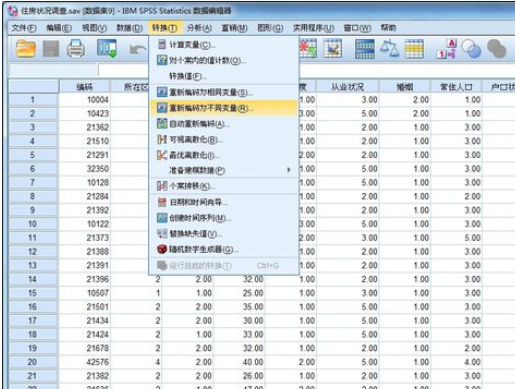
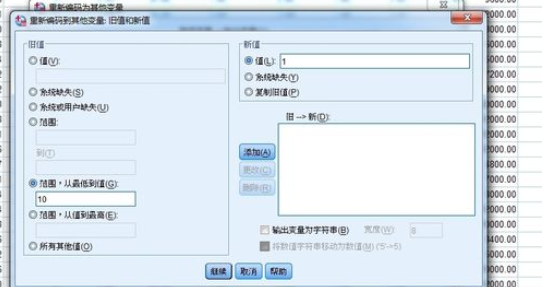
Select "Old Values and New Values" in the window. In the interface that appears, the old values are classified into new groups according to certain rules. Explain the first picture: Divide the numbers from the smallest to 10 in the old values into a new group, and the phrase code is 1. Don't forget the rules formed by the "Add" button; the explanations for other pictures are the same.
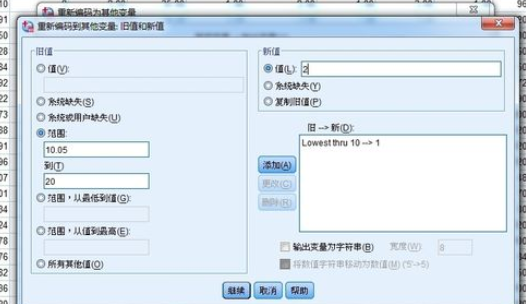
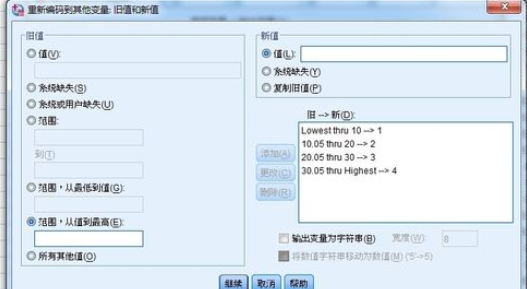
In "Output Variables", "Name" and "Label" are the names of new variables after classification.
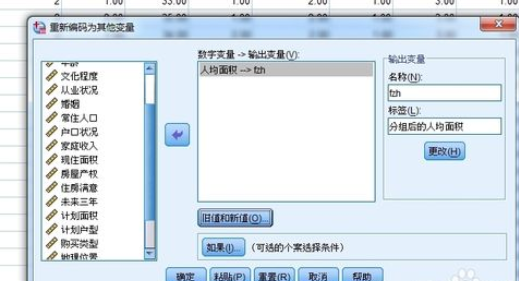
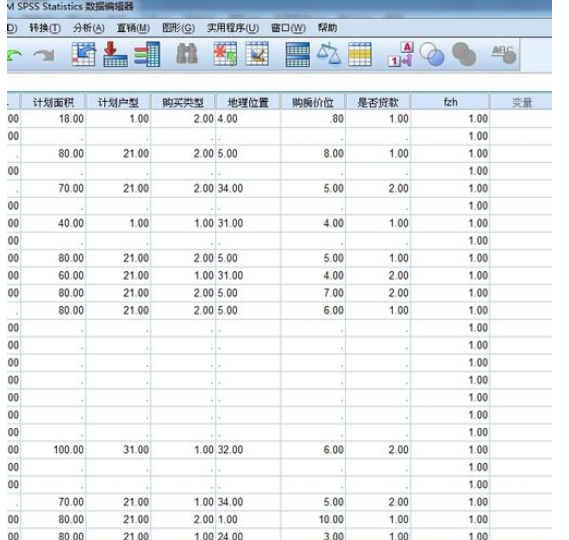
The final classification situation is shown in the variable name "fzh". The picture range is limited and only shows the first group of situations after classification.
The above explains the detailed steps for grouping data in SPSS. I hope friends in need can learn it.

 How to add background music in python-How to add background music in python
 How to configure environment variables in python - How to configure environment variables in python
 How to run python - How to run python
 How to create a project in python - How to create a project in python
 How to make a blue sky background with scratch-How to make a blue sky background with scratch
 Microsoft Edge browser
 Steam
Steam
 Tencent Video
 WPS Office
 iQiyi
iQiyi
 Sohu video player
 Lightning simulator
 MuMu emulator
 Eggman Party
 What to do if there is no sound after reinstalling the computer system - Driver Wizard Tutorial
 How to switch accounts in WPS Office 2019-How to switch accounts in WPS Office 2019
 How to clear the cache of Google Chrome - How to clear the cache of Google Chrome
 How to fire bullets in scratch-How to fire bullets in scratch
