
Hot search terms: 360 Security Guard Office365 360 browser WPS Office iQiyi Huawei Cloud Market Tencent Cloud Store
Hot search terms: 360 Security Guard Office365 360 browser WPS Office iQiyi Huawei Cloud Market Tencent Cloud Store

System optimization Storage size: 11.1MB Time: 2021-03-25
Software introduction: Xiaolu temperature monitoring is an independent Xiaolu temperature monitoring tool extracted from Master Lu combined with the technical support of Master Lu. It can be used after it is not occupied...
Can Xiaolu Temperature Monitor be uninstalled? Recently, many friends have been asking the editor about this question. In fact, it is possible. So today the editor will introduce to you the uninstall method of Xiaolu Temperature Monitor. Friends who are not sure about it should hurry up and learn it.
1. When Xiaolu temperature monitoring is running, Ctrl+alt+delete to bring up the task manager
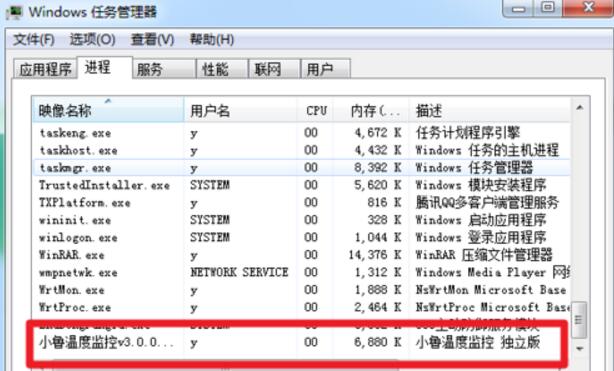
2. Find Xiaolu Temperature Control in the process, right-click it and click "Open File Location"
3. After opening the file location, select it, then right-click "Use 360 Powerful Delete" or delete directly
4. In 360, forcefully crush the file
5. Repeat steps 2-4 to delete Master Lu’s lete version.
6. Repeat steps 2-4 to delete the core process of Master Lu.
7. In the folder "temp" where the Master Lu core process was deleted, use 360 to forcefully delete all the files in the Master Lu core process file.
8. Click "Xiao Lu", and then the exit button will appear, click it.
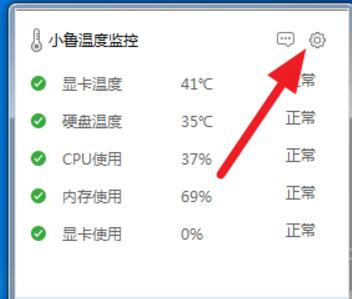
9. Turn on 360 Anti-Virus and 360 Security Guard, scan all of them on the computer, restart the computer, and it will be fine.
The above is the editor’s introduction to the uninstallation method of Xiaolu temperature monitoring. I hope it can help everyone.

 How to draw a lottery in 360 Software Butler - How to draw a lottery in 360 Software Butler
 How to collect software in 360 Software Manager - How to collect software in 360 Software Manager
 Microsoft Edge browser
 Steam
Steam
 Tencent Video
 WPS Office
 iQiyi
iQiyi
 Sohu video player
 Lightning simulator
 MuMu emulator
 Eggman Party
 What to do if there is no sound after reinstalling the computer system - Driver Wizard Tutorial
 How to switch accounts in WPS Office 2019-How to switch accounts in WPS Office 2019
 How to clear the cache of Google Chrome - How to clear the cache of Google Chrome
 How to fire bullets in scratch-How to fire bullets in scratch


