
Hot search terms: 360 Security Guard Office365 360 browser WPS Office iQiyi Huawei Cloud Market Tencent Cloud Store
Hot search terms: 360 Security Guard Office365 360 browser WPS Office iQiyi Huawei Cloud Market Tencent Cloud Store

Document business Storage size: 107.0 MB Time: 2016-08-31
Software introduction: The official version of CamScanner is an all-in-one mobile phone smart phone developed by Shanghai Hehe Information Technology Development Co., Ltd....
How to use Scanner to rename documents? How to operate it? Below, the editor will share with you the steps to rename documents with Scanner. Friends in need can take a look. I hope it can help you.
First, open Scanner and go to the home page. There are three little dots in the upper right corner of the page, as shown below.
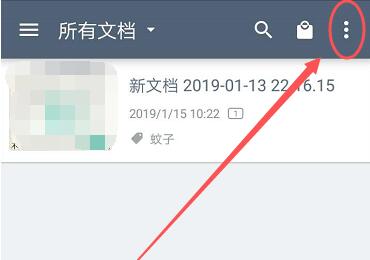
Click to open it, and then open the selection below the small box, as shown below
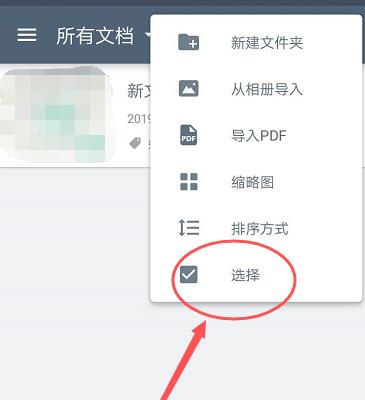
Then select the document that needs to be renamed, check the box behind the document, and then click More at the bottom of the page, as shown below
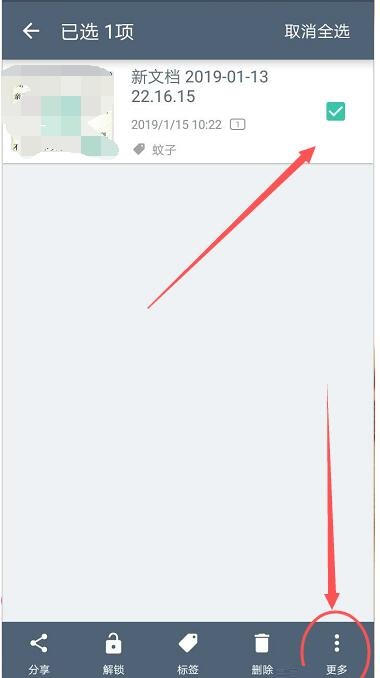
After opening more, you can see that there is a rename option, as shown below
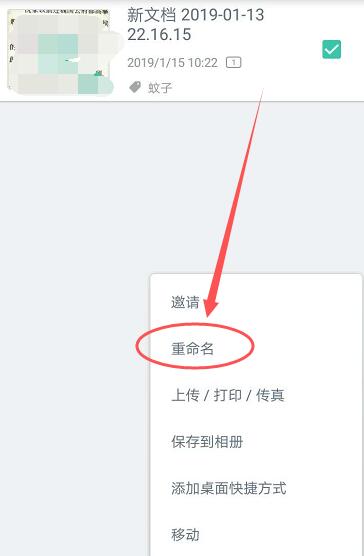
Click to open rename, then edit the name in the rename box and click OK, as shown below
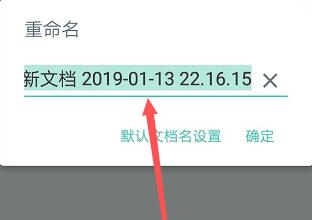
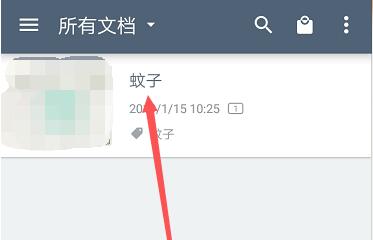
After confirming, return to the document page and you will see that the document just now has been renamed successfully.
The above are the steps shared by the editor to rename documents using Scanner. Friends who don’t know how to do this should quickly learn it.

 How to add background music in python-How to add background music in python
 How to configure environment variables in python - How to configure environment variables in python
 How to run python - How to run python
 How to create a project in python - How to create a project in python
 How to make a blue sky background with scratch-How to make a blue sky background with scratch
 Steam
Steam
 Tencent Video
 WPS Office
 iQiyi
iQiyi
 Sohu video player
 Lightning simulator
 MuMu emulator
 Eggman Party
 WPS Office 2023
 What to do if there is no sound after reinstalling the computer system - Driver Wizard Tutorial
 How to switch accounts in WPS Office 2019-How to switch accounts in WPS Office 2019
 How to clear the cache of Google Chrome - How to clear the cache of Google Chrome
 How to fire bullets in scratch-How to fire bullets in scratch
