
Hot search terms: 360 Security Guard Office365 360 browser WPS Office iQiyi Huawei Cloud Market Tencent Cloud Store
Hot search terms: 360 Security Guard Office365 360 browser WPS Office iQiyi Huawei Cloud Market Tencent Cloud Store

System assistance Storage size: 65.33MB Time: 2016-09-02
Software introduction: Driver Life 10 is a software that professionally solves computer driver problems and contains millions of hardware drivers. Perfectly supports 32-bit and 64-bit...
Some netizens have recently consulted the editor about the related operations of driving life to detect peripheral drivers, and today's article introduces in detail the operation of driving life to detect peripheral drivers. Friends in need should take a look.
First enter the main interface of driving life
In the function column, click to select the "Peripheral Driver" option. Here you can see the currently detected drivers. The current driver status will be displayed under each device. If the driver is displayed normally, it means that the device is working normally. If the USB device is plugged in again after the detection is completed, you only need to click the "Re-Detect" option in the red box to detect it, as shown in the figure:
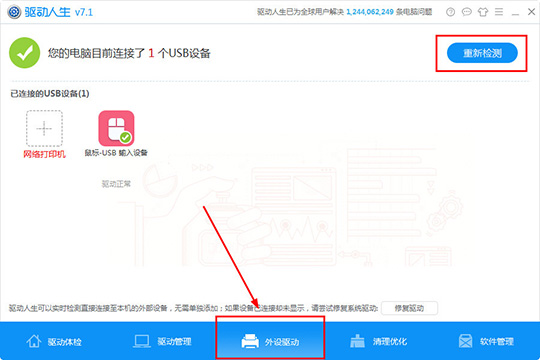
Driver Life can detect external devices directly connected to the machine in real time. There is no need to add them separately. If the device is connected but not displayed, just click the "Repair Driver" option in the lower right corner to repair it. The repair time is also very fast. Just wait patiently for a while, as shown in the picture:

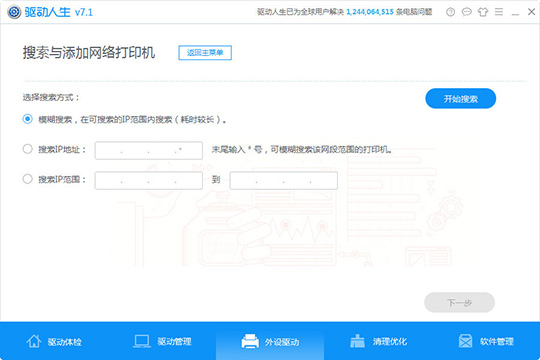
If you want to add a network printer, you can find the word "Network Printer" under the connected USB device. After entering, look for a search method, which can be a fuzzy search or an IP address or range search. Finally, click "Start Search", as shown in the figure:
The above explains the relevant operation process of driving life to detect peripheral drivers. I hope friends in need can learn from it.

 How to draw a lottery in 360 Software Butler - How to draw a lottery in 360 Software Butler
 Microsoft Edge browser
 Steam
Steam
 Tencent Video
 WPS Office
 iQiyi
iQiyi
 Sohu video player
 Lightning simulator
 MuMu emulator
 Eggman Party
 What to do if there is no sound after reinstalling the computer system - Driver Wizard Tutorial
 How to switch accounts in WPS Office 2019-How to switch accounts in WPS Office 2019
 How to clear the cache of Google Chrome - How to clear the cache of Google Chrome
 How to fire bullets in scratch-How to fire bullets in scratch


