
Hot search terms: 360 Security Guard Office365 360 browser WPS Office iQiyi Huawei Cloud Market Tencent Cloud Store
Hot search terms: 360 Security Guard Office365 360 browser WPS Office iQiyi Huawei Cloud Market Tencent Cloud Store

video editing Storage size: 590MB Time: 2021-12-30
Software introduction: EDIUS 8 is an excellent software that can help up owners and friends to make ghost videos. Almost all mature ghost video producers...
Some friends have just started using EDIUS software recently, and it is not very easy to use. The following article will share the operation content of EDIUS to create a subtitle stay effect. Friends in need can learn together.
Open Edius and create a new QuickTitle subtitle on the timeline (click "T" on the menu), or right-click to create it under the file menu bar.
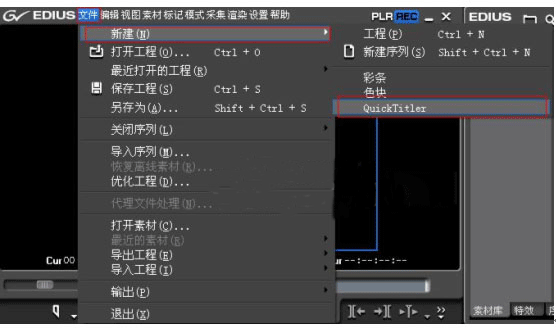
Figure 1: New menu bar
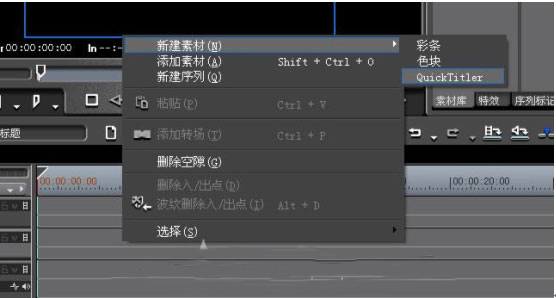
Open the main interface of QuickTime, manually enter the subtitles, and set the subtitles' size, font, edge, color, etc. in the text property box.

After clicking on the background, you can see the background attributes on the right side of the window. Set the subtitle type to scroll from bottom so that the subtitles will move.

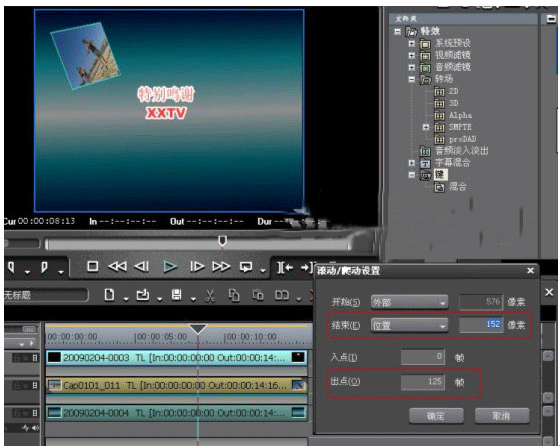
At this time, select the "Scroll/Crawl" setting in the right-click menu on the subtitle material.
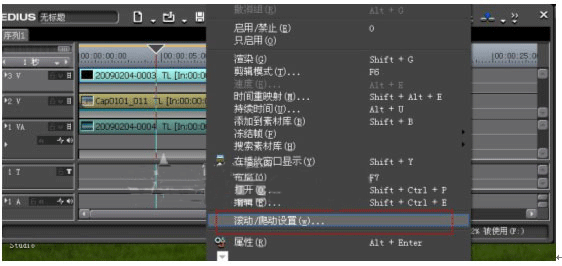
In the window that appears, we can see the external, internal, and position in the drop-down list at the end, which respectively refer to the external, internal, and position of staying on the screen. What we want to do here is to stop the subtitles on the last screen, so we choose to end and stay inside the screen. Set the dwell time, set the out point time to be the dwell time, set the out point to 125 frames, and then select the location in the drop-down list box.
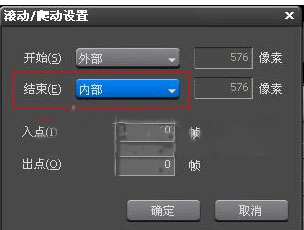
Finally, adjust the pixels at the back and set the best position for the subtitles to stay.
Above, I have shared with you the operation content of EDIUS to create a subtitle stay effect. Friends in need should hurry up and read this article.

 How to draw a lottery in 360 Software Butler - How to draw a lottery in 360 Software Butler
 How to collect software in 360 Software Manager - How to collect software in 360 Software Manager
 Microsoft Edge browser
 Steam
Steam
 Tencent Video
 WPS Office
 iQiyi
iQiyi
 Sohu video player
 Lightning simulator
 MuMu emulator
 Eggman Party
 What to do if there is no sound after reinstalling the computer system - Driver Wizard Tutorial
 How to switch accounts in WPS Office 2019-How to switch accounts in WPS Office 2019
 How to clear the cache of Google Chrome - How to clear the cache of Google Chrome
 How to fire bullets in scratch-How to fire bullets in scratch


