MySQL server has gone away How to recover deleted chat history on WeChat on mac system_Huajun Software Park
If you are looking for software to use, go to Huajun Software Park! software release AI product list
Location: Home pageTutorial strategyTutorialComputer software tutorials mac system like...

How to recover deleted chat history on WeChat on mac system

Author: Huluwa Date: 2017-03-22

Happy Phone Recovery Master Mac version
Happy Phone Recovery Master Mac Version-1.0.9.233

data recovery Storage size: 35.37MB Time: 2020-08-07

Software introduction: Kaixin Mobile Recovery Master is a professional iPhone data recovery and backup software that can restore iOs without jailbreaking the device...


Download now
How to restore deleted WeChat chat history? A few days ago, when my nephew was playing with my phone, he accidentally deleted all my WeChat chat history. What should I do? There is still a lot of report information that needs to be recorded in WeChat! If you, like me, accidentally deleted the WeChat chat history on your phone, then I have to say, you are really lucky!
 
image001.jpg
 
Why do you say that? Because through my unremitting efforts, I finally found a method to restore WeChat chat history on iPhone. Let me show you the specific operation method of restoring WeChat chat history on iPhone. It is actually very simple. We only need to use a WeChat data recovery software "Happy Phone Recovery Master" to easily retrieve deleted WeChat chat history! Then we will use the Mac system as an example to show you how to recover deleted WeChat records on Apple phones:
 
Kaixin Mobile Phone Recovery Master is a professional mobile phone data recovery software that supports three different recovery modes: recovery through device scanning, recovery through iTunes backup, and recovery through iCloud backup to recover lost WeChat chat history, address book, text messages, memos, photos and other data. It can be operated without jailbreaking. It is simple and convenient.
 
Tutorial on how to recover deleted iPhone WeChat chat history from Kaixin Mobile Recovery Master:
 
The first step is to connect the Apple phone that accidentally deleted the WeChat chat history to the computer. It is recommended to use a commonly used computer to operate, which can save the time of installing the Apple phone driver again;
 
image002.jpg
 
In the second step, if we need to retrieve the deleted WeChat chat history, we also need to download Kaixin Mobile Recovery Master to the computer. Since the software is compatible with Windows and Mac systems, we must choose according to our own operating system;
 
image003.jpg
 
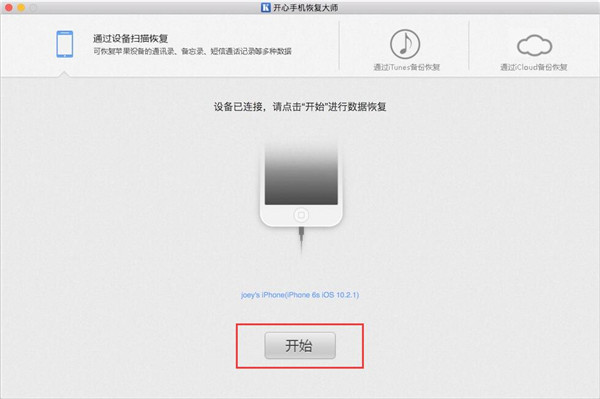
Step 3: Directly run Kaixin Mobile Phone Recovery Master. When the main interface displays "Device Connected", it means that the system has identified the Apple phone that needs to restore WeChat chat records. Simply click [Start] below to enter the recovery mode of WeChat chat records;
 
image004.jpg
 
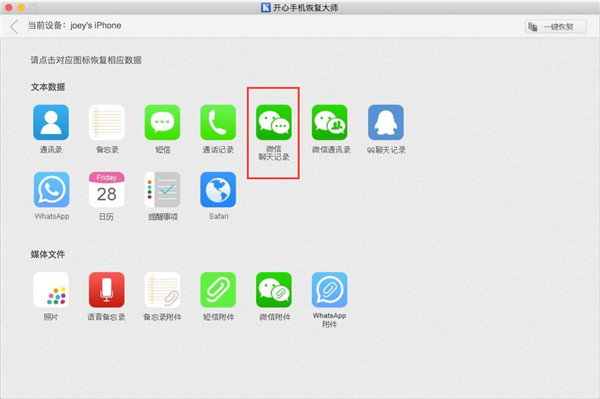
Step 4. If you want to view the text records in the WeChat chat history, select the [WeChat Chat History] icon in the data recovery mode interface. If you want to view the pictures, voices, and video files that appear in the chat history deleted by WeChat, click [WeChat Attachments];
 
image005.jpg
 
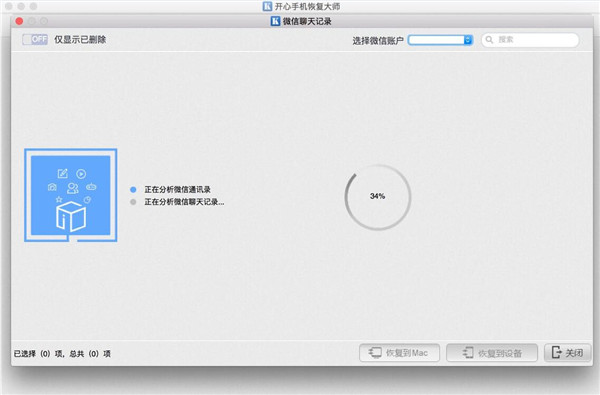
Step 5: After clicking the icon, the system will enter the state of automatic analysis and recognition. The time required will vary depending on the memory size of each person's mobile phone. Generally, the scan can be completed within 10 minutes and the state of restoring WeChat chat records can be completed;
 
image006.jpg
 
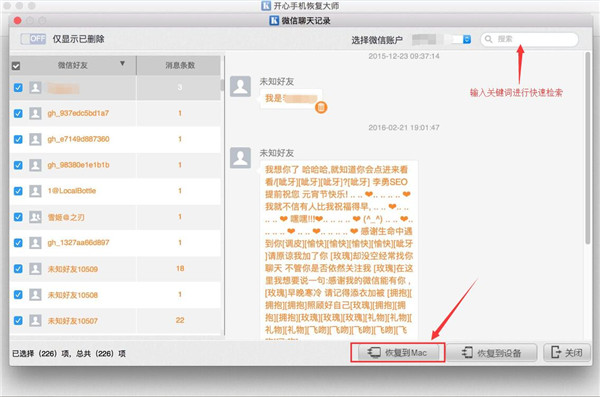
Step 6: After the scan is completed, you can preview the result list. Then the system will mark the deleted WeChat chat records in orange. If there is a lot of data, you can directly click [Show Deleted Only] to switch to view; finally, check the WeChat account corresponding to the content of the WeChat chat records that need to be restored, and then click [Restore to Mac] to back up the WeChat chat records to your computer for easy viewing later.
 
image007.jpg
 
How to recover deleted chat history on WeChat on Mac system? The above is the detailed recovery method. As a professional WeChat record recovery software, if the pictures, voices, and videos in your WeChat are also deleted, you can easily retrieve them through Kaixin Mobile Recovery Master!

Related articles

</