
Hot search terms: 360 Security Guard Office365 360 browser WPS Office iQiyi Huawei Cloud Market Tencent Cloud Store
Hot search terms: 360 Security Guard Office365 360 browser WPS Office iQiyi Huawei Cloud Market Tencent Cloud Store

web browsing Storage size: 86.2 MB Time: 2022-04-24
Software introduction: Sogou High-speed Browser has upgraded its built-in high-speed kernel to a new version. In terms of speed and performance, Sogou High-speed Browser is more advanced than the previous version...
1. Install and open Sogou Search, click [More] on the main interface and select [Settings].
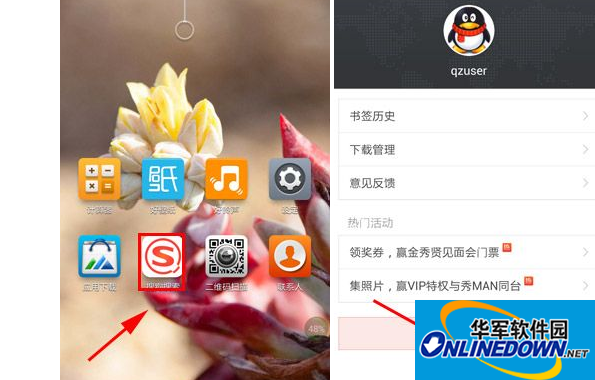
Sogou search
2. Click [Privacy] in the settings interface, and finally adjust [Record Search History] to the disabled state.
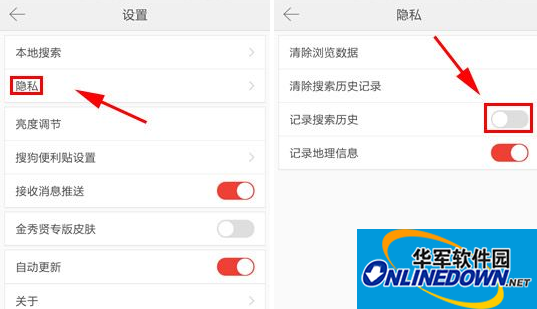
Record search history

 How to draw a lottery in 360 Software Butler - How to draw a lottery in 360 Software Butler
 Microsoft Edge browser
 Steam
Steam
 Tencent Video
 WPS Office
 iQiyi
iQiyi
 Sohu video player
 Lightning simulator
 MuMu emulator
 Eggman Party
 What to do if there is no sound after reinstalling the computer system - Driver Wizard Tutorial
 How to switch accounts in WPS Office 2019-How to switch accounts in WPS Office 2019
 How to clear the cache of Google Chrome - How to clear the cache of Google Chrome
 How to fire bullets in scratch-How to fire bullets in scratch


